
Is Bonsai worth considering?
Yes if you recognize yourself here: freelancers/agencies wanting to bring together customer management and back-office. Activity management for freelancers and agencies. Less suitable for: product teams looking mainly for advanced sprint/agile. In this case, look at an alternative of the same category.
In this review
Bonsai at a glance
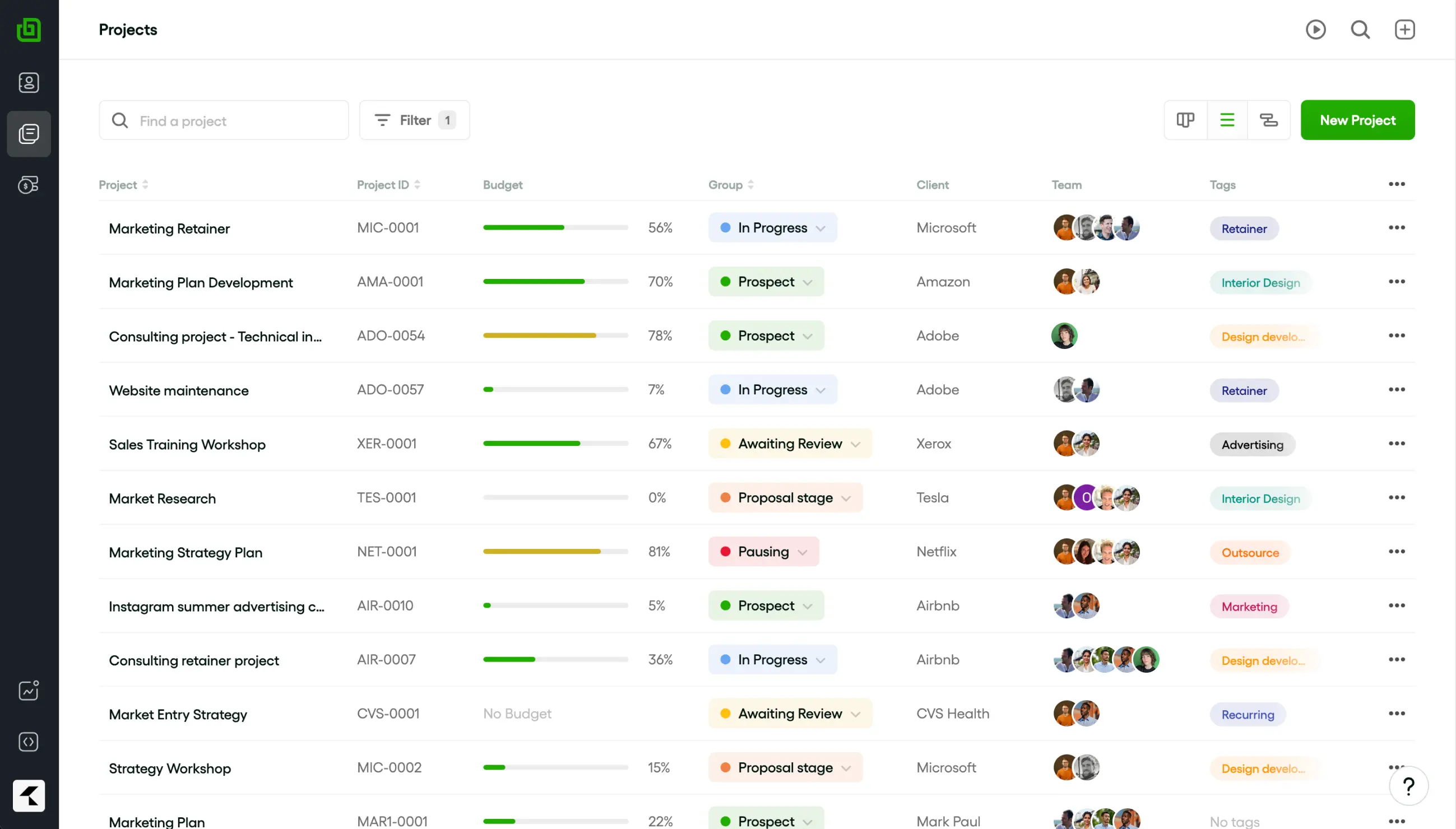
Official visual of Bonsai: what it represents
Projects interface presented on the official Bonsai page. This is an official product visual, distinct from an interface screenshot. Logicelio relates it to the product’s positioning, “Business management for freelancers and agencies”, and to these features: proposals and contracts, projects and tasks, and time tracking and invoicing. It makes no claims about elements that are not visible in the image.
The visual comes from an official Bonsai resource.
View Bonsai on the official website →
What to remember before choosing Bonsai
Bonsai is relevant when the question is no longer just to complete the tasks, but whether a mission remains in the promised budget. The comparison must be based on the method of sale: package, time spent or recurring service. Time tracking serves as a scoping or pricing decision, not just an additional table.
Price checked on 26 September 2026; check the current price before choosing.
Original Test Title: Bonsai Review 2026: Is It Worth It for Freelancers?
What Bonsai offers on a daily basis
The grid places time, tasks, projects and CRM in Basic. Proposals, contracts, invoices and payments appear in Essentials. For a service activity, compare the level covering the documents actually used, not just the smallest amount displayed.
Bonsai distinguishes chargeable rates and member costs. Without properly informed cost and time, a cost-effectiveness chart can give a misleading picture of the mission. Decide which hours are included in the cost, including unreacted corrections and exchanges.
The documentation distinguishes several ways to bill projects. On a fixed-fee project, an extra hour does not automatically create more revenue. On a time-based project, recorded work still needs approval and invoicing. Track effort, the billable amount and payments received separately.
Proposals can prepare the creation of an invoice. Check selected options, deadlines and customer information before sending. Automate the pass only when the team knows how to process a partial acceptance, a field change or a cancelled document.
When this option makes sense
Who it is for: providers and agencies who want to link the work delivered to the budget sold.
When to look at another approach: The Basic price does not cover the entire trade route. An agency waiting for contracts, invoices and detailed analysis must compare the corresponding offers and its separate accounting organisation.
A studio selling the package
The studio must be able to spot a mission that consumes too much time before it closes. Bonsai deserves a test if employees can register their work regularly and if a manager acts on the discrepancies. Without this discipline, adding a margin ratio will not correct the initial framing.
Price: what you really need to budget
Limits that may change your mind
The Basic price does not cover the entire trade route. An agency waiting for contracts, invoices and detailed analysis must compare the corresponding offers and its separate accounting organisation. The grid places time, tasks, projects and CRM in Basic. Proposals, contracts, invoices and payments appear in Essentials. For a service activity, compare the level covering the documents actually used, not just the smallest amount displayed.
Three checks to see if Bonsai suits you
Compare the budget of a mission to the package with the time actually needed to produce it.
- Describe package
Create a demonstration project with its sales amount, deliverables and hours assumptions. Avoid mixing commercial and internal costs.
- Save Overrun
Add an unbilled client correction and observe the cost of the project. Determine when to reframe the perimeter.
- Read the client document
Prepare a proposal and invoice it without sending it to a real customer. Control deadlines, options, currency and export opportunities.
What PickedByPro actually tested
This test was carried out by PickedByPro, not by Logicelio. I cite it to provide a perspective based on actual use, without adopting its verdict as my own.
The protocol announced: Return hands-on after actual use of Bonsai as the main tool, compared to four alternatives for freelancers.
The test highlights integrated customer workflow: proposals, contracts, time and billing: while stressing that the product is not necessarily the best choice for all freelance profiles.
Read the original test on PickedByPro ↗Bonsai facing the closest solutions
| Software | Positioning | Profile | Cost to watch |
|---|---|---|---|
| Bonsai this review | Management of client missions with time, documents and economic monitoring | providers and agencies who want to link the work delivered to the budget sold | users and the offer covering documents, billing and cost-effectiveness analysis |
| Agiled CRM | A suite of customer path management for service companies | self-employed and agencies that want to avoid divestitures between sale and supply | the package, seats included and ceilings of documents, projects and workflows |
| BizzBox | Platform of monitoring and creation functions for the activity | small structures that want to reduce retrieving between simple tools | users and functions actually replaced |
See all alternatives to Bonsai →
Scope of the documentation
Interface language: incomplete documentary verification.
Sources used for this review
Documentary review of 27 September 2026. Margin cases are proposed exercises; no financial gain is measured.