In this guide
In an audit Semrush, start with the pages that must receive your customers: an inaccessible service, a button to a deleted page or a noindex added by mistake pass before the title retouches. Open the relevant URLs and confirm the defect before requesting a correction quote.
Analysis of official documentation, with no testing on a paid account.
Check what Semrush has gone through
This guide is for the head of a small business that receives an Audit Site report and must decide what to correct. First, find the date of the passage and the list of pages explored. A limited audit of the blog may leave your request for quotation aside.
The official configuration distinguishes exploration by site links, sitemaps and an imported URL list. Website mode starts from the host and follows the links. To examine a specific path, the import accepts a text file with one URL per line. You can bring together the service page, contact and intermediate pages.
The free account announces 100 audit pages per month. Keep this quota in mind before rerunning the whole site after every change. Beyond that, you must narrow the scope or choose a suitable paid plan. A subscription is justified by the coverage and frequency required; our comparative Semrush and SE Ranking treats this choice separately.
Sort alerts by effect on page
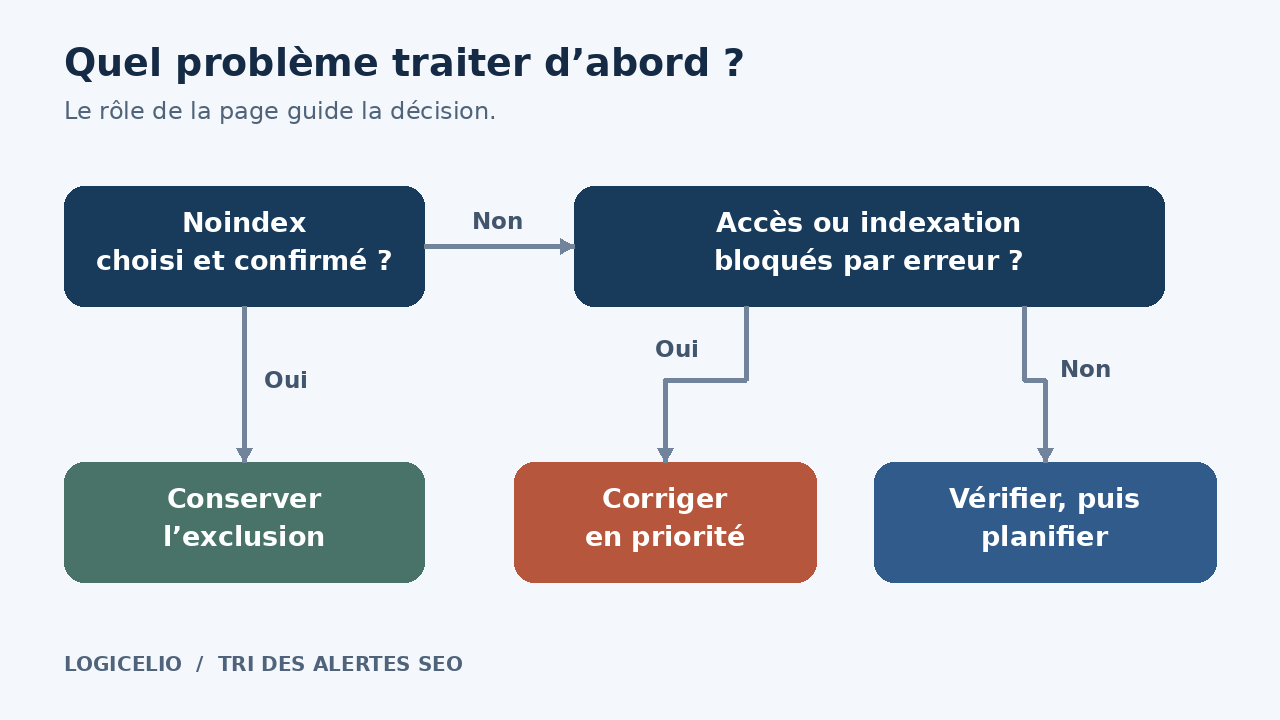
In the report Outputs, Semrush separates Errors, Warnings and Notices. Click on an anomaly to get its URLs and see the explanation How to fix. The documentation of the report also states that the Notices are excluded from the overall health score. These levels provide a starting point. Your order of work then depends on the role of each page.
| Status confirmed | Proposed decision | Evidence to be requested |
|---|---|---|
| A delivery or contact page responds in 5xx | Re-establish access first. | Page and expected content accessible, then route control from the reception. |
| A menu link leads to an old URL in 404 | Correct the link; provide a redirect to the equivalent page if it has changed address. | Direct link to the right page, with an accessible final destination. |
| A benefit to be promoted carries an involuntary noindex | Remove this exclusion and check the other rules on the page. | Directive removed, page exploreable, then review URL in Search Console. |
| An internal search page carries a selected noindex | Keep this choice if it matches your indexing policy. | Role of the page and reason for the exclusion recorded. |
| Two different benefits have the same title | Give each individual a specific title, after access blockages. | Separate titles in the relevant pages and new audit passage. |
The Google HTTP Rules explain the handling of server errors, missing pages and redirects. They reinforce the priority given to access. For the Noindex, Google must be able to explore the page to read the directive. So have robots.txt, page tags and server headers examined together.
An example of sorting a troubleshooting company
Let's take a troubleshooting site with a service page, a quote form and old news. In this built example, the report indicates a link from the menu to /demande-devis in 404, an identical title on two performances and several missing descriptions on news.
The quote page now exists at /devis. The first request to the provider is specific: modify the menu link and redirect the old address to the same request for quotation. After intervention, open the menu on the phone, reach the correct form and check its fields. If you then test a shipment, identify it as a test with the person receiving the requests.
The titles of the services come next: they must distinguish between the services offered. The descriptions of the old news remain in a second request, with the relevant URLs. The estimate can thus separate the repair of the customer journey from editorial changes. No traffic gain is calculated from the number of alerts alone.
Distinguish a robot's refusal to fail for customers
An error-reported URL can open in your browser. The list of controls Semrush lists attack protection and server problems among the possible reasons for a link being incorrectly reported as broken. Record the URL, time and reported status code before passing the issue to the hosting provider.
Ask him to compare the response received by SiteAuditBot with that of a visitor. Thetroubleshooting aid also lists robot.txt restrictions, connection protected pages and perimeter settings. Adjust the responsible rule on the public pages concerned. Keep the protections of customer areas and administration.
Verify a fix on the URLs, then rerun the audit
For each intervention, keep four informations in your follow-up: URL, confirmed defect, change requested and evidence obtained. A line can be as simple as: " /demande-devis, menu link in 404 ; link updated to /devis, former address redirected ; mobile route checked on the day of delivery".
Run the audit again with the same scope and settings. Semrush explains that changing the configuration can change the results and the number of issues. Compare the corrected URLs, then check whether a new defect has appeared elsewhere. The overall score tracks the site as a whole; accepting the requested work depends on the pages delivered.
When this work justifies Semrush
Audit Site is suitable when you have to find the same defect on several pages and follow its corrections. For a single broken link, a targeted check with your provider may suffice. If the question is about a page missing from Google, also use the URL inspection of Search Console It provides the indexing status and canonical status retained by Google.
An audit note does not guarantee a position in Google. To choose your next construction site, bring confirmed defects to your service pages and customer requests. The Semrush review presents the tool; the guide choose a SEO tool for an SME helps decide if a subscription meets your need.
Sources and method of this analysis
Semrush: Free account limits ; Semrush: configure the scope of Site Audit ; Semrush: read report Issues ; Semrush : list of controls ; Semrush: solve a refusal to the robot ; Google: HTTP codes and exploration ; Google : use noindex ; Google : URL inspection Perimeter: sorting technical alerts from Site Audit and correction control. Sources consulted on 22 October 2026. Methodology · Trade transparency · Report correction.