In what case watch Canva?
Canva is relevant for independent and small teams that need to quickly produce consistent content without complex design workflow. For a very technical creative production, advanced colorimetric needs or complex professional workflows, compare a specialized suite.
In this review
Canva at a glance
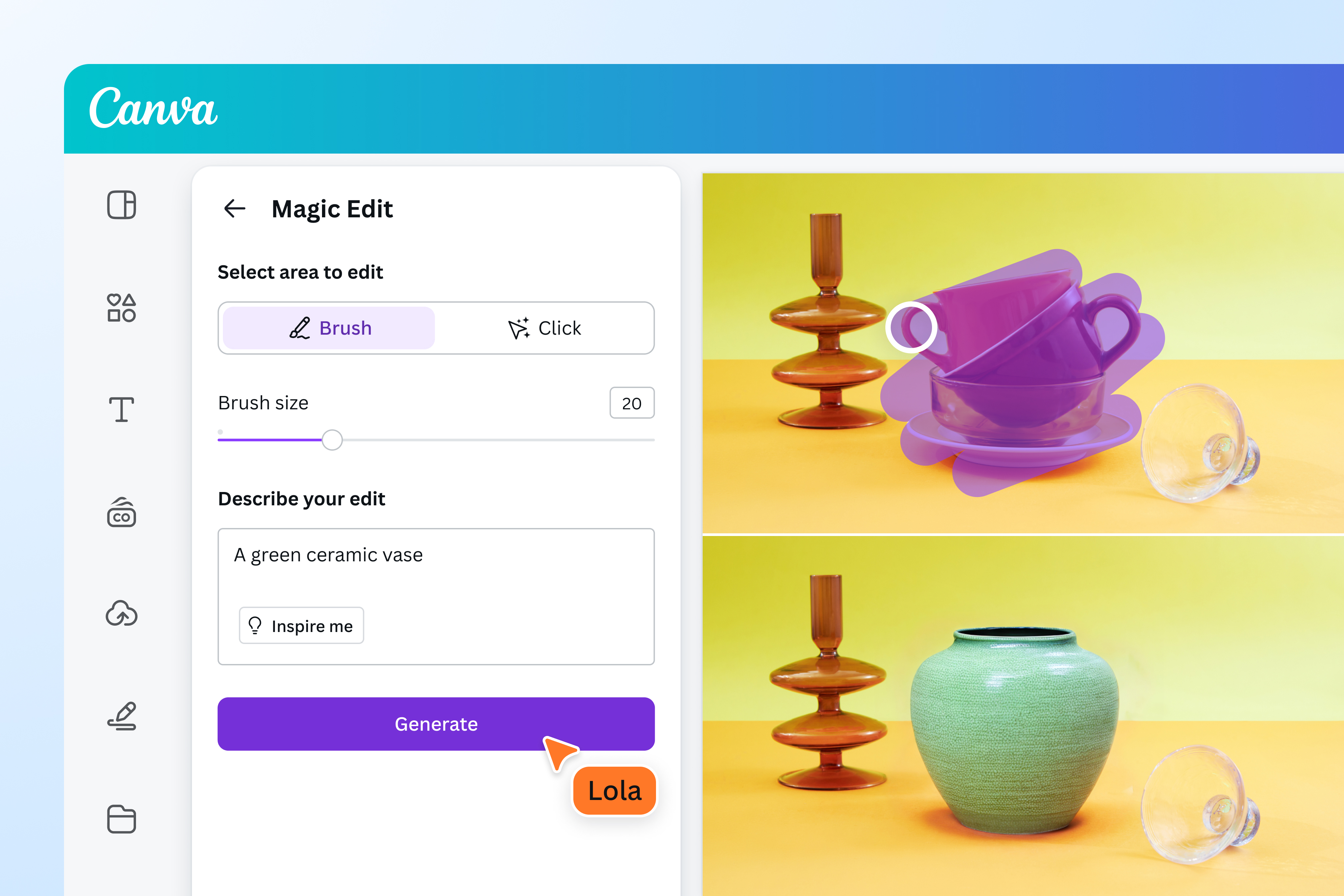
Canva interface: what this capture shows
Editor Canva with Magic Edit presented on an official Canva page. Logicelio uses this capture as a visual cue to read with its positioning "Graphic creation, presentations, photo, video and content assisted by AI" and the graphical editor and models functions, Kit brand and collaboration, Photo, video and presentations. This image is not a trial of the software.
The capture comes from an official Canva resource.
View Canva on the official website →
What to remember before choosing Canva
Canva is useful when the team often has to produce close media: ads, presentations or campaign visuals. Its value depends on the quality of the prepared models and the rules of reuse. A good model makes the changes simple while preventing each new publication from changing its style.
the members, brand functions and content required.
What Canva offers on a daily basis
Prepare editable areas, formats and brand rules. Have the model tested by the person who will use it. A nice but fragile support, which disorganizes in the first long title, does not solve the need for autonomy.
Canva distinguishes in particular free content, Pro and content subject to special conditions. The licence agreement must be consulted for the intended use. Do not present a paid library as a stock free of any restrictions.
The documentation specifies commercial limits for Pro content accessible via Canva Education. A professional activity must not assume that its educational access covers its sales media. Check the appropriate account and license.
Check dimensions, quality, readability and editable elements in the exported format. For a client who wants to take the document back, also define the transfer and the necessary resources. A ready-to-read PDF is not always a source file ready to edit.
When this option makes sense
Who it is for: small teams that regularly decline consistent supports.
When to look at another approach: Access to a library element does not mean that all commercial uses, resales or transfers are permitted. Check the license of the content and context of use.
Canva: deliver a visual, model or file to print
These three deliverables do not require the same audits. For a small business, first choose what the recipient should be able to do: look at the result, modify its own copy or launch an impression. The ease of creation counts less if the delivered file then requires an intervention from the creator at each change.
What the vendor documents
Documentation consulted on
Canva distinguishes view, comment and edit permissions. Its documentation warns that public sharing may expose hidden or cropped content, presentation notes and earlier revisions.
Canva: accessible content and sharing ↗Cut markers are chosen in the PDF Print export. Margin, bottom and marker dimensions are not customizable; these options are not available in Canva Docs.
Canva: margins and printing ↗
Previous editorial version: .
| Your situation | Key point to check | Decision proposed by Logicelio |
|---|---|---|
| Disseminating a completed advertisement | Open the export on the phone and check the readability of the price, date and contact. | Delivering the final file; a link to the edition adds an unnecessary right here. |
| Trusting a colleague in the future | Edit a copy by the recipient with their own account, including images and contents Pro. | Hold the template only if the resumption does not depend on your session or on inaccessible elements. |
| Order flyers from a printer | Get instructions of dimensions, color and lost background, then submit the exported PDF. | Confirm compatibility; Canva fixed settings may not cover a particular specification. |
Example to prepare: a commercial offer declined each month
Using a copy with no confidential data, prepare an announcement with a heading twice as long as the original and a portrait photo instead of a landscape image. Ask the person who will publish it to change only the month and price. Note any overflowing content, paid elements encountered and corrections that still require the template owner. This is a suggested exercise, not a test carried out by Logicelio.
Before delivering a public link, remove hidden pages, notes and unnecessary items, and then create a new copy to share, as recommended by Canva to avoid transmitting old revisions. For printing, also check the downloaded file: the preview of the vendor does not constitute a validation of the PDF by the printer.
Canva deserves to be retained for repeated production if colleagues take over the models and if the output formats are suitable. For a deliverable subject to specific printing specifications, validate a cookie file before equipping the team. The content license remains a separate check of the right of access to the design.
A small businesses that publishes every week
Canva can simplify the work if a small library of reliable models is maintained. The priority is consistency and resumption by the team. Buying more models does not compensate for brand instructions or poorly defined user rights.
Budget: compare the right scope
Budget Canva: members, brand functions and content required.
Limits that may change your mind
Access to a library element does not mean that all commercial uses, resales or transfers are permitted. Check the license of the content and context of use. Prepare editable areas, formats and brand rules. Have the model tested by the person who will use it. A nice but fragile support, which disorganizes in the first long title, does not solve the need for autonomy. The French translation helps to read; Canva specifies that the English version prevails in case of divergence.
Three checks to see if Canva suits you
Prepare a communication model that two colleagues can decline without visual inconsistency.
- Create three variants
Test short title, long title and different image to identify the limitations of the model.
- Control elements
Identify external content or Pro and verify its use in the expected deliverable.
- Check export
Reread on the phone or in the expected print format, then check the recipient's resume.
Organize the delivery of files to the client
For a service with Canva, clarify the deliverable before creation: final image, PDF distribution or template that the client can change. A policy or item available on your account does not guarantee the same possibilities on your account. Prepare a copy for delivery, check the resources it uses and agree on who will retain the master model. This organization counts more than a successful export in isolation.
Canva facing the closest solutions
| Software | Positioning | Profile | Cost to watch |
|---|---|---|---|
| Canva this review | Visual creation from models and library elements | small teams that regularly decline consistent supports | the members, brand functions and content required |
| Adobe Creative Cloud | Suite of creative applications with cloud subscriptions and services | creators who regularly produce professional files in several disciplines | the necessary applications, commitment and general uses |
See all alternatives to Canva →
Scope of the documentation
Canva pricing: no amount was recorded for this review.
Interface language: incomplete documentary verification.
No third-party test cited; documentary review only.
Sources used for this review
Documentary review of 27 September 2026. No timed comparative test; fees must be checked for each content used.