In what case watch Nitro PDF?
Nitro PDF deserves a test if you are looking for a PDF environment with editing, conversion and signature. Check your team, deployment and portability constraints before generalizing usage.
In this review
Nitro PDF at a glance
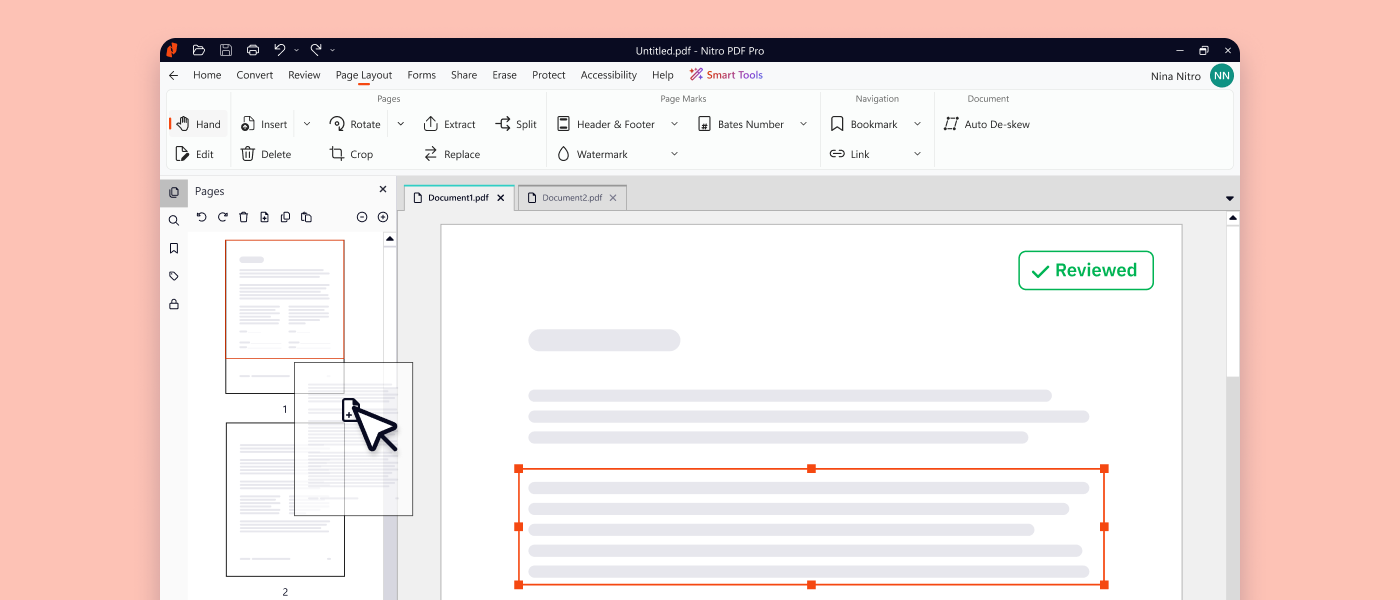
Nitro PDF interface: what this capture shows
Publishing and organizing a PDF presented on the official Nitro website. Logicelio uses this capture as a visual cue to read with its position "Creating, editing and signing PDF documents" and functions Document creation or processing, Data collection, signature or transformation, Workflow, validations and automations. This image is not a trial of the software.
The capture comes from an official Nitro PDF resource.
View Nitro PDF on the official website →
What to remember before choosing Nitro PDF
Nitro must be compared on the documents of your activity: scans, forms, converted desktop files and folders to share. The family includes PDF and Nitro Sign tools. A distinction must be made between file modification, the addition of a signature and the organization of a signature circuit between several people.
PDF product, post office and possible Nitro Sign service.
What Nitro PDF offers on a daily basis
The grid separates the products and their capabilities. Describe who prepares the documents, who signs them and how the evidence is kept. A need for one-off modification is not a weekly flow of contracts.
The vendor documents text recognition and conversion. Test documents with tables, accents and numbers, then reread important areas. A workable conversion for a search may still require corrections before reuse in a contract.
Nitro offers tools to remove sensitive information, including assisted functions. Suggestions should be reviewed before application. Control the exported file: neither an automatic detection nor a visual mask replaces the validation of the remaining content.
The range includes several systems and products. Check the exact offer available on your workstations and the features that need to be consistent between colleagues. A procedure designed for one system may need adapting for another.
When this option makes sense
Who it is for: Teams that regularly work with PDF files and want to clarify their signature requirements.
When to look at another approach: Do not assume every Nitro Sign feature is included in a PDF licence. Check the plan, operating system and product generation offered.
A team looking for an alternative for its PDF files
The pilot must compare the same operations and formats as the current tool. The cost is relevant if the documents remain accurate and transferable. Do not retain a license saving that would move a long correction work on the team every week.
Budget: compare the right scope
Nitro PDF budget: the PDF product, seats and any Nitro Sign service.
Limits that may change your mind
Do not assume every Nitro Sign feature is included in a PDF licence. Check the plan, operating system and product generation offered. The pricing table separates the products and their capabilities. Describe who prepares the documents, who signs them and how evidence is retained. Occasional editing should not be costed in the same way as a weekly flow of contracts.
Three checks to see if Nitro PDF suits you
Convert a demo scan, correct your data and prepare a shared copy.
- Sample Documents
Include scan scan, table and form representative of current work.
- Control conversion
Compare numbers and layout to the original, then look for items that are supposed to be removed.
- Set Signature
Separate local signature and circuit sent to recipients, then check the product and proof required.
Select a representative documentary batch
To evaluate Nitro PDF, gather a scan, a PDF created in a word processor and a form to complete. These files require different features and reveal constraints that a demonstration document does not show. If several colleagues need to sign, describe that workflow separately to assess Nitro Sign. The plan comparison should maintain this separation between document preparation, conversion and signature collection.
Nitro PDF facing the closest solutions
| Software | Positioning | Profile | Cost to watch |
|---|---|---|---|
| Nitro PDF this review | PDF Edition with Documentary Tools and Separate Signature Product | Teams that regularly work with PDF files and want to clarify their signature requirements | the PDF product, workstations and any Nitro Sign service |
| Adobe Acrobat | PDF tools with editing and protection functions according to offer | Professionals who receive, correct and share PDF documents | necessary editing, contract and documentary functions |
See all alternatives to Nitro PDF →
Scope of the documentation
Nitro PDF pricing: no amount was recorded for this review.
Interface language: incomplete documentary verification.
No third-party test cited; documentary review only.
Sources used for this review
Documentation review dated 27 September 2026. No OCR recognition rate or comparative performance was measured.