
Is PandaDoc worth considering?
Yes if you recognize yourself here: commercial teams sending lots of proposals and contracts. Proposals, estimates, documents and signatures. Less suitable for: independents only needing a few simple signatures. In this case, look at an alternative of the same category.
In this review
PandaDoc at a glance
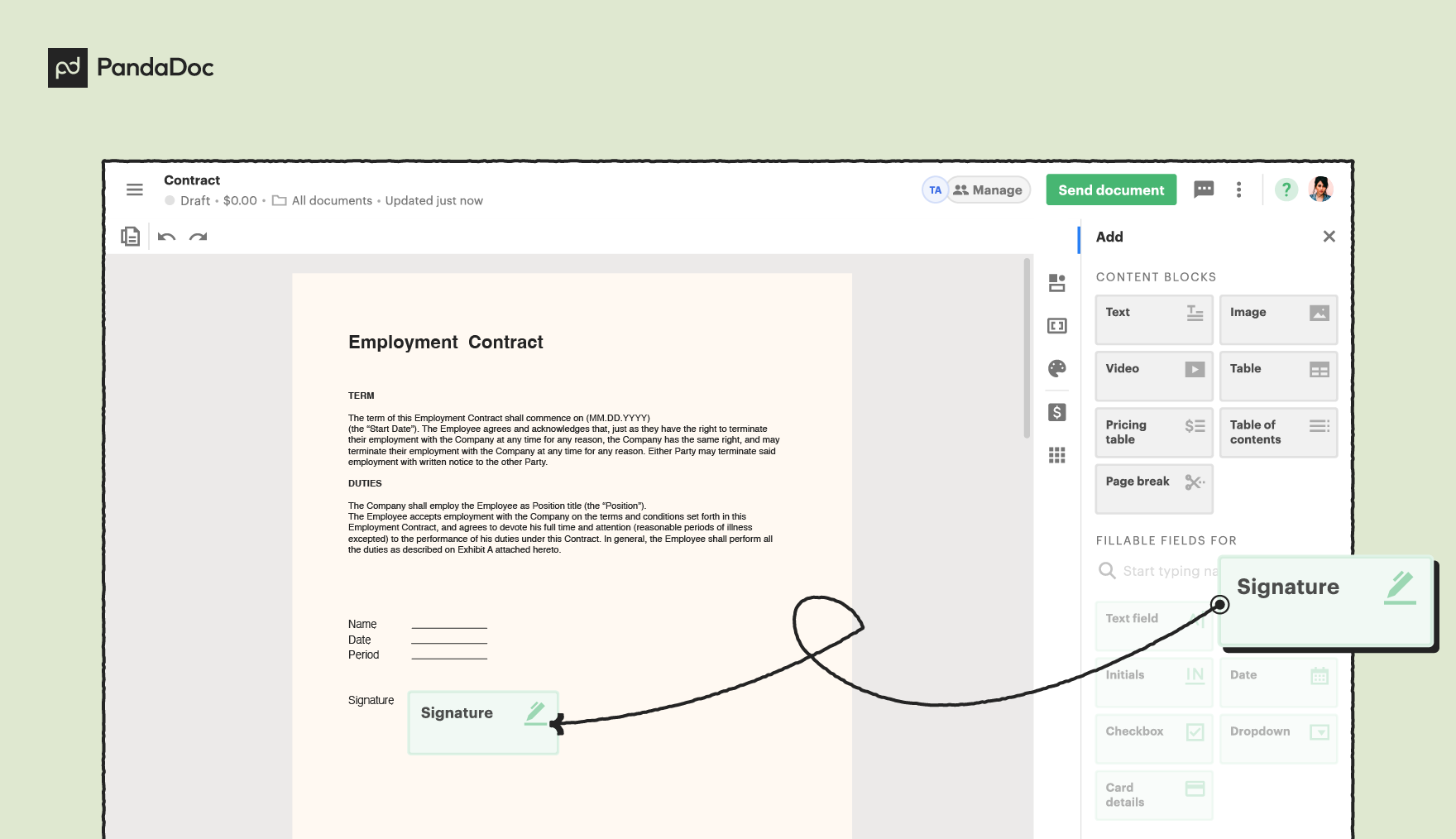
Official visual of PandaDoc: what it represents
PandaDoc editor showing a signature field being added to a document. This is an official product visual, distinct from an interface screenshot. Logicelio relates it to the product’s positioning, “Proposals, quotes, documents and signatures”, and to these features: document creation, business proposals and electronic signatures. It makes no claims about elements that are not visible in the image.
The visual comes from an official PandaDoc resource.
View PandaDoc on the official website →
What to remember before choosing PandaDoc
Compare PandaDoc for two uses: having a document prepared elsewhere signed, or building a structured sales proposal. The latter may require pricing tables, templates and integrations beyond basic signing. Describe that workflow before choosing a plan.
Price checked on 12 October 2026; check the current price before choosing.
Original Test Title: PandaDoc review
What PandaDoc offers on a daily basis
New Free accounts allow 5 sends per month, with 2 recipients per document and 5 templates. Existing annual accounts retain 60 sends per year; switching to Free through support may also follow that cycle. Check the quota and its reset date in your account. Being able to create a document does not mean you can send unlimited documents.
The aid explicitly distinguishes Free eSign and temporary pay trial. Note the functions used during the pilot and the plan that will then retain them. Otherwise, validation can be based on a capacity absent from the eventually chosen subscription.
If products or prices come from a CRM, check the currency, discounts and catalogue versions. An attractive proposal based on an outdated price creates a business risk. Arrange approval for exceptions before sending it.
The grid presents pricing per seat or document depending on the offer. Compare them on the volume and number of contributors. A stakeholder who occasionally prepares a proposal does not have the same consumption profile as an active trader every day.
When this option makes sense
Who it is for: teams who want to link offer, price options and customer validation.
When to look at another approach: Free eSign and the fourteen-day test do not have the same perimeter. A function visible during the test shall not be assumed to be retained free of charge.
PandaDoc: arrange corrections after sending a quote
The quotation sent becomes a version that the customer must be able to recognize. A price or perimeter correction requires a different process than a simple change in status in the dashboard. The choice of PandaDoc also depends on the validation, correction and archiving rules that your team can apply.
What the vendor documents
Documentation consulted on
PandaDoc explains that changing the content of a sent document returns it to draft and requires it to be sent again. Completed signature and initial fields are erased; the documentation warns that a completed document cannot be recovered after it has been edited.
PandaDoc : edit sent document ↗Manually passing a document to Completed status does not produce a signature certificate. This operation can be used to record an off-platform realization without proof of a signature in PandaDoc.
PandaDoc: manual status changes ↗
| Your situation | Key point to check | Decision proposed by Logicelio |
|---|---|---|
| Correct an amount after sending | Relevant version, fields already completed and people who need to review the document. | Prepare a new validation and send; do not assume that previous signatures remain valid in the journey. |
| Save a signed document off platform | Copy received, source and retention location of external evidence. | Use the tracking status without presenting it as a certificate generated by PandaDoc. |
| Closing a proposal whose conditions have expired | Targeted document, recipient access and change notifications. | Define who can close the proposal and explain to the client which version replaces the old one. |
A fictitious estimate to circulate before adopting the process
Create a demo proposal with no real contact details, including an amount, a term and a designated signatory. Describe what should happen if the amount changes after sending and if another person makes the decision. Ask salespeople to find the version to send and managers to identify the approvals needed. This exercise aims to clarify the workflow; no customer signature was collected for this review.
Define an archive location for finalised documents before editing anything. In your tracking, distinguish at least between sending, completing the signature process and confirming receipt of payment. A sales status alone does not demonstrate the other two events. The legal effect required depends on the document and context; this review does not assign a universal signature level to every PandaDoc workflow.
Choose PandaDoc if your team needs control over proposal preparation and versions as well as signatures. If the only need is to sign an already approved PDF, compare a more narrowly focused service. In both cases, assess evidence and document retention separately from the colour of the sales status.
An agency that customizes each quote
PandaDoc may be relevant if the models reduce recovery while maintaining price control. If the documents are already prepared elsewhere and few, compare the simple signature perimeter first. The need for business creation must justify the superior offer.
Price: what you really need to budget
Limits that may change your mind
Free eSign and the fourteen-day trial do not cover the same features. New Free accounts allow 5 sends per month, with 2 recipients per document and 5 templates. Existing annual accounts retain 60 sends per year; switching to Free through support may also follow that cycle. Check the quota and its reset date in your account. Being able to create a document does not mean you can send unlimited documents.
Three checks to see if PandaDoc suits you
Prepare a fictitious proposal with options and then check the signed data.
- Build perimeter
Distinguish document to sign and proposal to create with tables or integrations.
- Test an exception
Add a discount and an option, then check internal, total and final validation.
- Compare models
Calculate seat and document costs for a typical month and then a peak month, using the same features.
What TechRadar actually tested
This test was carried out by TechRadar, not by Logicelio. I cite it to provide a perspective based on actual use, without adopting its verdict as my own.
Old Source: this test dates from 13 June 2023 and exceeds the editorial threshold of 24 months. The product may have evolved.
The protocol announced: Document creation tests, signatures, templates, fields and workflow tracking.
PandaDoc is considered very rich and versatile, especially to create complex documents, but its large number of functions can impress and the import of documents is not always obvious.
Read the original test on TechRadar ↗PandaDoc facing the closest solutions
| Software | Positioning | Profile | Cost to watch |
|---|---|---|---|
| PandaDoc this review | Preparation and signature of commercial documents | teams who want to link offer, price options and customer validation | the necessary seats or documents and proposal functions |
| Docusign | Sending and tracking documents for electronic signature | teams who want to organize a signature circuit and keep their evidence | users, envelopes and identification or signature options |
| SignNow | Electronic signature with contract-dependent capacity rules | teams who want to compare the volume sent rather than the number of employees | invitations included, overruns and account billing model |
See all alternatives to PandaDoc →
Sources used for this review
Initial documentary review of the 27 September 2026; quotas Free reverified the 12 October 2026 in the official guide. No actual contract or CRM integration enabled.