
Is ActiveCampaign worth considering?
Yes if you recognize yourself here: teams with complex marketing paths. Email marketing, advanced automation and CRM. Less suitable for: small lists with only basic campaigns. In this case, look at an alternative of the same category.
In this review
ActiveCampaign at a glance
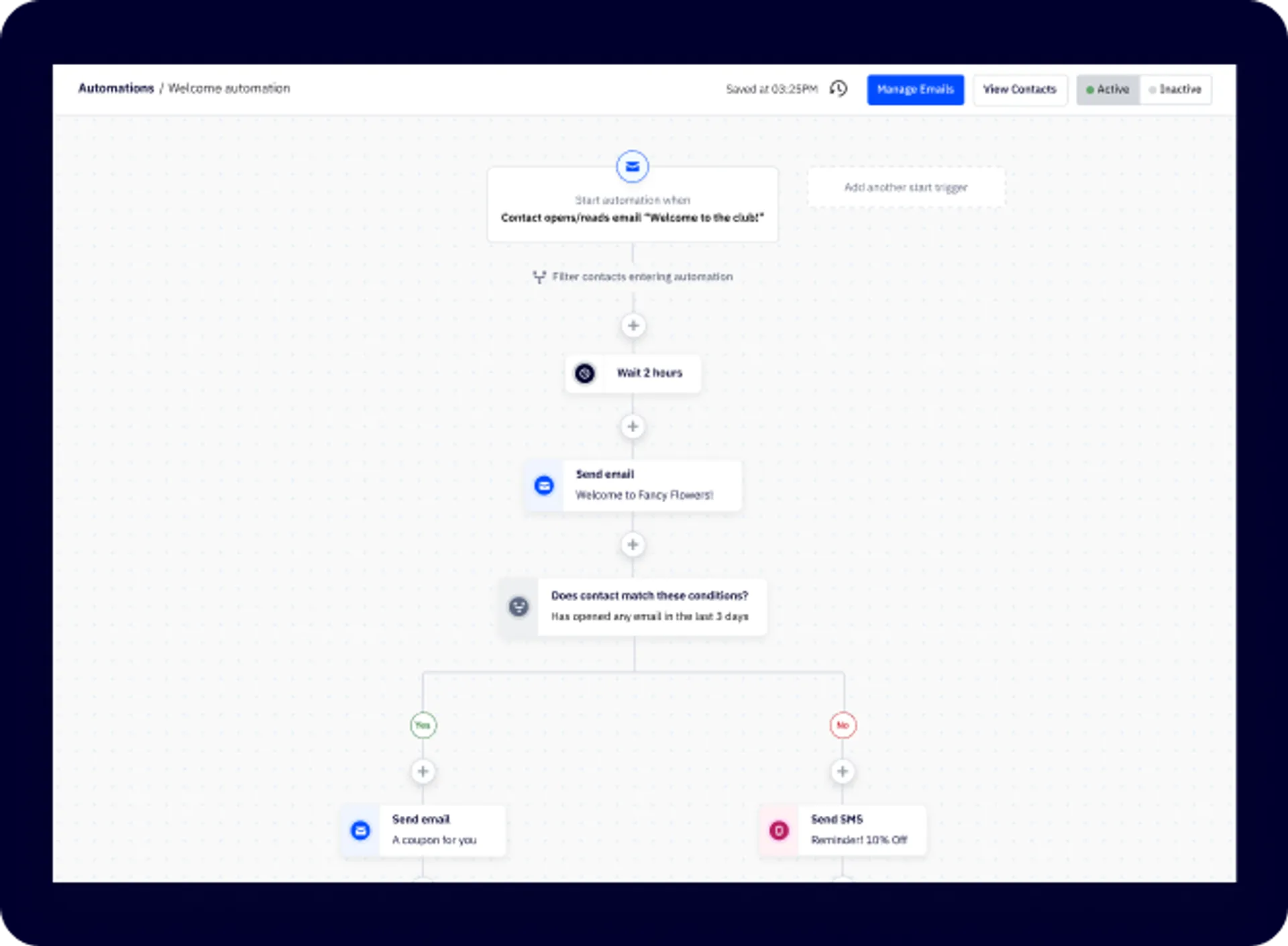
Official visual of ActiveCampaign: what it represents
Automation Builder presented by ActiveCampaign. This is an official product visual, distinct from an interface screenshot. Logicelio relates it to the product’s positioning, “Email marketing, advanced automation and CRM”, and to these features: automation workflows, segmentation and email marketing. It makes no claims about elements that are not visible in the image.
The visual comes from an official ActiveCampaign resource.
View ActiveCampaign on the official website →
What to remember before choosing ActiveCampaign
ActiveCampaign is mainly to be considered when automation becomes a business process, not just an email sequence: the plans and complementary modules are built around this complexity climb.
contacts and marketing functionality level/CRM.
Original Test Title: ActiveCampaign Review (2026): Why It's Our Top Pick for Automations
What ActiveCampaign offers on a daily basis
To build a sequence, first draw the expected entry, condition and output. Use fictitious contacts to check that a response or a status change stops messages that have become useless. Check separately the actions accessible in the package envisaged.
The segmentation must meet an explanatory rule: provenance, stated interest or stage of the journey. Prepare a small list with the expected result, then compare inclusions and exclusions. A misunderstood rule can send the right content to the wrong people.
For a one-time campaign, read the sender, links and display on the phone before sending. Also check unsubscribe with voluntary internal addresses. Add campaigns and sequences in your volume forecast instead of counting only stored contacts.
Define the transition between marketing contact and an opportunity followed by a salesman. Check what sales functions and accesses are included in the selected offer. The triggering of an email does not prove that the next commercial action is correctly assigned.
What to know about ActiveCampaign
- 01
ActiveCampaign presents several levels of marketing plans and allows to add SMS modules, custom reporting, transactional email and reinforced CRM.
- 02
Offers are designed around marketing automation, commitment and loyalty.
- 03
The level of the plan and the add-ons can therefore weigh more on the final cost than the number of campaigns alone.
When this option makes sense
Who it is for: teams with complex marketing paths.
When to look at another approach: Small lists with only basic campaigns.
Budget: compare the right scope
ActiveCampaign offers an EUR selector, but the calculator did not deliver a verifiable amount in euros for the contact level selected the 28 September 2026. The international price of Starter is no longer used as a French tariff.
Budget ActiveCampaign: contacts and level of marketing/CRM functionality.
View offers from ActiveCampaign →
Limits that may change your mind
The review highlights powerful automation and reporting, with a steeper learning curve and costs that rise with the number of contacts. Confirm the Starter price in euros for your contact tier using the official calculator. For a small list used only for simple newsletters, extensive automation may add cost and complexity without a proportionate benefit. Estimate your numbers of contacts, sends, automations and users over 12 months: these often determine when you need to change plans.
Sources of these limits
Three checks to see if ActiveCampaign suits you
Evaluate ActiveCampaign using an automation with a branch and an exit: a sophisticated follow-up is useful only if its rules remain explainable.
- Trigger and re-enter
Create an internal contact and trigger a follow-up. Check what happens when that contact meets the entry condition a second time.
- Branch and exclusion
Separate the contacts according to a known attribute, then modify this attribute. Follow the path actually planned and exclude unregistered contacts.
- Marketing and CRM
List the sales actions expected after a reply. Check the modules, seats and options needed to pass them into the pipeline.
Draw outputs of your automation
To prepare a ActiveCampaign course, also draw what stops messages: purchase, unsubscribe, segment change or take over by a salesman. A sequence of conditions can be correct separately and produce a bad result when a contact enters several automations. Have this diagram read again before its configuration. Specify which event is true and which can change the rule; the choice of plan comes then, from the functions necessary for this journey.
What EmailToolTester actually tested
This test was carried out by EmailToolTester, not by Logicelio. I cite it to provide a perspective based on actual use, without adopting its verdict as my own.
The protocol announced: Real use and methodical testing of automations, vendor and reporting.
The test highlights the power of automation and reporting, with a sharper learning curve and an increasing cost with contacts.
Read the original test on EmailToolTester ↗ActiveCampaign facing the closest solutions
| Software | Positioning | Profile | Cost to watch |
|---|---|---|---|
| ActiveCampaign this review | Email marketing, advanced automation and CRM | teams with complex marketing journeys | the contacts and level of marketing/CRM features |
| GetResponse | Email marketing, automations, funnels and landing pages | businesses where email is an important acquisition channel | the number of contacts and level of automation |
See all alternatives to ActiveCampaign →
Scope of the documentation
ActiveCampaign pricing: no amount was recorded for this review.