
In what case watch Bitwarden?
Bitwarden is relevant for users and small teams who want a shared safe with an open source approach and administration options. If you are looking for a broader SaaS access governance platform or a highly integrated business experience, compare 1Password as well.
In this review
Bitwarden at a glance
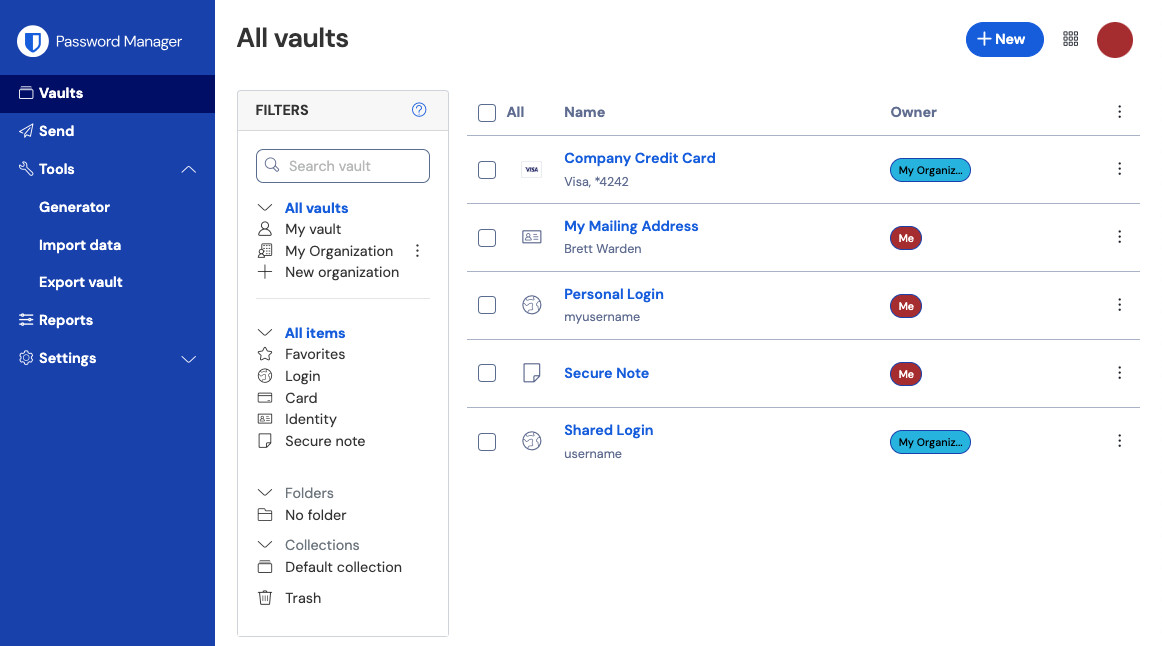
Bitwarden interface: what this capture shows
View All boxes of the Bitwarden web application published in the official help. Logicelio uses this capture as a visual cue to read with its "Open Source Password Manager for Individuals, Teams and Businesses" positioning and the Auto Filler functions, Shared Organizations and Collections, Passkeys, TOTP and security tools. This image is not a trial of the software.
The capture comes from an official Bitwarden resource.
View Bitwarden on the official website →
What to remember before choosing Bitwarden
Bitwarden should be evaluated on ordinary situations as well as on recovery: fill in an ID, find a note, share access and exit the service properly. Good migration is not only a successful import. It assumes that exclusions, attachments and shared elements remain understood by the users.
the personal or team offer and the necessary recovery functions.
What Bitwarden offers on a daily basis
The help documentation distinguishes between an account-restricted export and a password-protected export that can be imported into another Bitwarden account. Choose according to your recovery scenario. A backup file may be unusable at a critical moment if you do not understand whether it depends on the original account.
Bitwarden allows you to designate a trusted contact that can request emergency access, depending on the conditions of the offer. The time and level of access granted must be understood. This mechanism is not limited to confining its main password by email.
For collective work, review the organization and collections that members access. Decide which identifiers belong to the company and which elements remain personal. The administrator must be able to explain the departure of a member without improvising a general copy of the vault.
Prepare a small set of demo entries, export it in the selected format and control the recovery procedure. Possible unencrypted exports require adequate protection and cleaning; do not leave them in a shared folder or attachment.
When this option makes sense
Who it is for: users who want to keep a clear backup and transmission procedure.
When to look at another approach: Do not confuse an encrypted export with a backup reusable in every situation. The chosen mode may tie the file to its original account.
An independent who wants to be able to transmit
The choice depends on the continuity scenario: emergency access to a person or management of an organization. A low price does not resolve this decision. Remember the configuration you can explain recovery and revocation, and then check it on a test box.
Budget: compare the right scope
Budget Bitwarden: the personal or team offer and the necessary recovery functions.
Limits that may change your mind
Do not confuse an encrypted export with a backup reusable in every situation. The chosen mode may tie the file to its original account. The help documentation distinguishes an account-restricted export from a password-protected export that can be imported into another Bitwarden account. Choose according to the recovery scenario. A file saved without understanding its dependence on the account may be unusable at a critical moment.
Sources of these limits
Three checks to see if Bitwarden suits you
Prepare a test box, limited sharing and backup including restoration.
- Sort accesses
Separate personal and professional entries with fictitious data. Control the rights of the shared collection.
- Choose Export
Note the dependencies of the selected format and protect the backup password separately from the file.
- Preparing for unavailability
Define the trusted person and the scope of access granted. Check the request procedure and its waiting period without exposing real secrets.
Bitwarden facing the closest solutions
| Software | Positioning | Profile | Cost to watch |
|---|---|---|---|
| Bitwarden this review | Password management with individual offers and organizations | users who want to keep a clear backup and transmission procedure | the personal or team offer and the necessary recovery functions |
| 1Password | Password manager with sharing and recovery procedure | freelancers and teams that want to organise access without sharing passwords through messaging | membership, type of subscription and renewal conditions |
| LastPass | Personal and Professional Password Manager | users who want to compare their device fleet and sharing needs | licence type, members and coverage across devices |
| NordPass | Password management with personal, family and professional offers | users who alternate between multiple devices and want to clarify their access | the plan and the number of people who need access |
See all alternatives to Bitwarden →
Scope of the documentation
Bitwarden pricing: no amount was recorded for this review.
Interface language: incomplete documentary verification.
No third-party test cited; documentary review only.
Sources used for this review
Documentary review of 27 September 2026. No independent cryptographic evaluation or manipulation of customer secrets.