
Is Make worth considering?
Yes if you recognize yourself here: no-code teams building multi-step workflows. Advanced visual automation between applications. Less suitable for: users wanting to self-host their automation engine. In this case, look at an alternative of the same category.
In this review
Make at a glance
Official visual of Make: what it represents
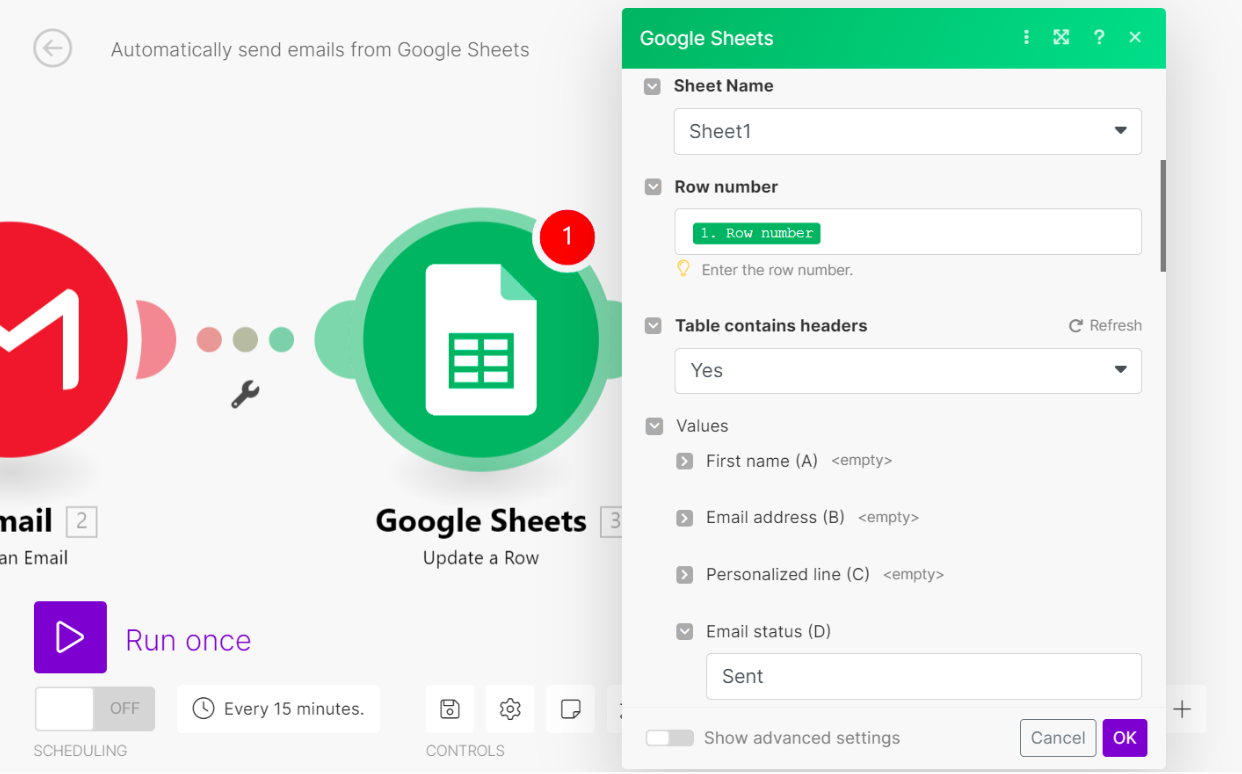
Make scenario editor published in an official guide. This is an official product visual, distinct from an interface screenshot. Logicelio relates it to the product’s positioning, “Advanced visual automation between applications”, and to these features: visual scenarios, several thousand integrations, and routes, filters and transformations. It makes no claims about elements that are not visible in the image.
The visual comes from an official Make resource.
View Make on the official website →
What to remember before choosing Make
Make suits a team that wants to see how data moves between its applications and understand where it changes. For a sales enquiry form, the real work is deciding whether the contact already exists, what information is required and who takes over a failed request. Drawing the scenario helps make these decisions visible; it does not replace them.
Price checked on 12 October 2026; check the current price before choosing.
Original Test Title: Make Review 2026: Is This Automation Tool Worth It?
What Make offers on a daily basis
Most actions consume one credit; some AI features have variable usage. Count searches, transformations and repetitions, rather than only the number of forms received. A workflow that loops through order lines can perform far more actions than one that handles a single record.
Free includes 1 000 monthly credits and a minimum interval of fifteen minutes for scheduled scenarios. This may suit a pilot with a daily follow-up, while an alert needed within a minute requires examining another plan. Distinguish this scheduling interval from the connector’s own trigger mechanism.
A scenario can call an AI provider using your own connection. The provider’s charges are then added to Make’s charges. Set a budget per useful outcome: a qualified request, a reconciled invoice or a record created. A reduction in credits used has little value if errors increase.
The JSON export retains the structure and settings of the scenario, but the connections to the accounts are to be recreated at the import. Keep next to the file the list of authorizations, the business owner and the duplicate rule. An export alone does not prove that another person will be able to return the flow to service.
When this option makes sense
Who it is for: teams who want to connect their applications without running a server.
When to look at another approach: If you have to administer the automation engine yourself, compare a self-hosted solution. If no one repeats the errors, reduce the perimeter before generalizing.
Example: a command with multiple lines
An order containing ten product references is not equivalent to a request containing a single name. If the scenario searches for each product separately, the workload increases. Before changing subscriptions, check whether the data can be retrieved together. This design decision may matter more than the annual discount, but it must retain the checks that prevent quantity errors.
Price: what you really need to budget
Limits that may change your mind
Make charges in credits, with variable usage for certain AI features. The number of incoming requests is therefore not enough to size a subscription: measure searches, transformations and loops as well. Exporting a blueprint preserves the scenario's structure but requires connections to be recreated after import. Prepare a recovery procedure with the necessary permissions and duplicate handling; a JSON file alone does not restore the process to service.
Sources of these limits
What the starting price leaves out
The additional cost to estimate
Make invoice in credits. On most non-AI modules, one operation is credit, but some AI functions use credits dynamically depending on tokens, file size, pages or processing time. An identical scenario can therefore cost differently depending on the modules used.
Verified the 21 September 2026 · Official source ↗
What you can export
A Make scenario can be exported in JSON blueprint and reimported to another account. The blueprint keeps modules, settings and mapped values, but connections to accounts must be recreated after import.
Verified the 21 September 2026 · Official source ↗
The upgrade that makes a difference
Core, listed at 9 $US/month with annual billing for 10 000 credits, unlocks unlimited active scenarios, scheduling every minute and API access, among other features. Teams adds team roles and template sharing.
Verified the 12 October 2026 · Official source ↗
Dependencies to consider
With a custom AI-provider connection on paid plans, Make charges credits for operations while tokens are paid for separately to the AI provider. You therefore need to add the two bills together.
Verified the 21 September 2026 · Official source ↗
Three checks to see if Make suits you
To evaluate Make, record the credits consumed by a small set of fictitious requests and then review the resumption after error.
- Prepare three different requests
Use a new contact, a known contact and a request without a valid address. Define the expected result before building the scenario. No message should go to a real client during this pilot.
- Read counter and errors
Launch each case separately, then a small batch. Identify the actions actually executed and look for the cause of any deviation. Add a simulated unavailability of the destination service to observe what remains to be repeated.
- Reimport into a test space
Export the blueprint, recreate the demonstration connections and check all three requests. Note the time and explanations required for the person who takes over the stream.
What Canopyne actually tested
This test was carried out by Canopyne, not by Logicelio. I cite it to provide a perspective based on actual use, without adopting its verdict as my own.
The protocol announced: Create a Google Sheets scenario to Gmail and run from end to end in a real account.
The workflow worked after correcting a Gmail authorization problem. The test highlights the visual flexibility of Make but also its vocabulary and learning curve.
Read the original test on Canopyne ↗Make facing the closest solutions
| Software | Positioning | Profile | Cost to watch |
|---|---|---|---|
| Make this review | Hosted visual automation, with credit consumption | teams who want to connect their applications without running a server | modules executed, loops and external AI services |
| Albato | Hosted automation billed by plan and transaction volume | independents who want to link a business path between applications | transaction package and automatic additional purchases |
| n8n | Technical workflows available in Cloud or on your infrastructure | teams able to describe data, errors and stream maintenance | execution, hosting resources and operating time |
| Pabbly Connect | Hosted automation with counting of external actions | small structures that transform data before sending them to several services | external tasks and the exact conditions of the offer purchased |
See all alternatives to Make →
Scope of the documentation
Interface language: incomplete documentary verification.
Sources used for this review
Make: 27 documentary review September 2026. The routes described are audit proposals, with no in-house testing or measured economy.