Analysis of official documentation, with no testing on a paid account.
In this guide
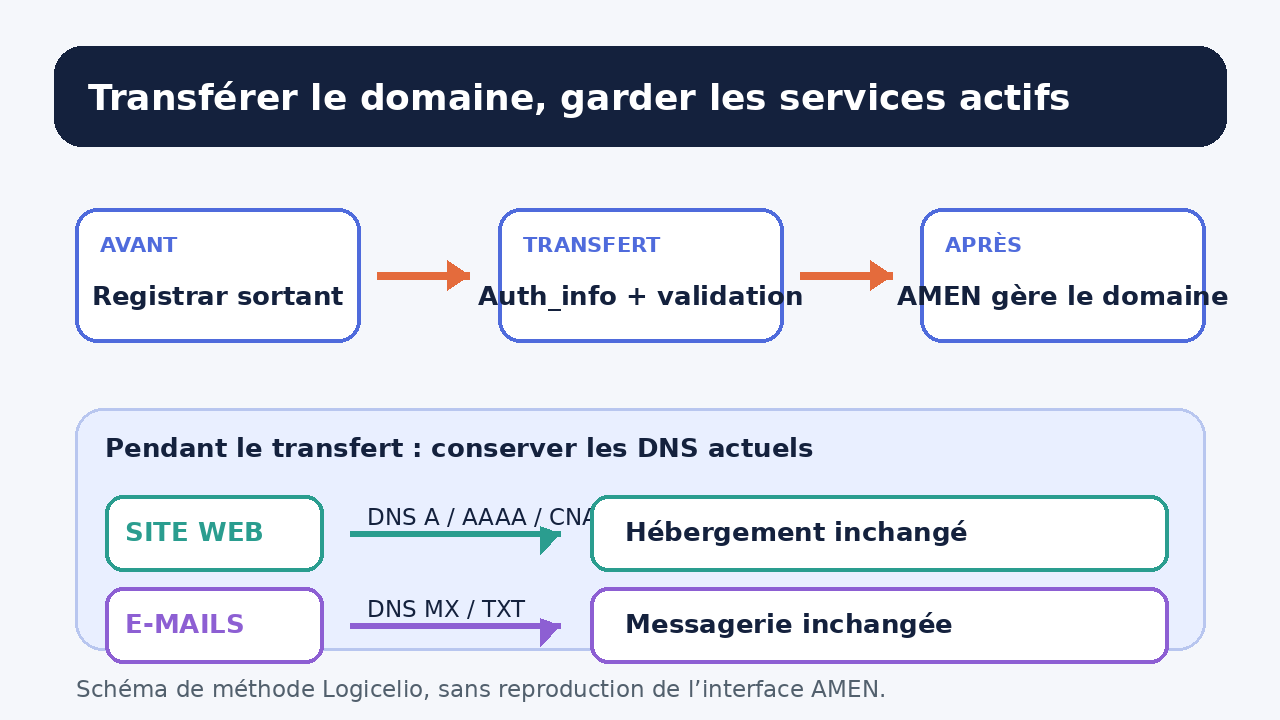
First transfer management of the domain while keeping its current DNS, then change the hosting or email service in a separate operation. This sequence reduces the number of variables to diagnose if the website or email becomes unavailable.
Documentary review of Amen and Afnic procedures, without access to a customer account, an actual transfer, a DNS change or sending an email.
Distinguish the domain, DNS and services
The registrar manages the name and administrative operations. DNS servers publish the destinations. Web hosting serves the website, while the email provider handles messages. Four different providers may perform these roles.
Before making a request, record the current registrar, authoritative DNS servers, website destination and email provider. Also keep a list of the relevant A, AAAA, CNAME, MX and TXT records. This inventory provides a reference if a destination must be restored.
| Element | Proof to be kept | Risk if you confuse it |
|---|---|---|
| Domain holder | Name, reachable contact details and recovery access | Administrative validation may remain blocked. |
| Registrar | Outgoing provider name and expiry date | The request goes to the wrong contact. |
| Authoritative DNS | Exact list of name servers | The website and email may point elsewhere. |
| DNS zone | Copy of the relevant records | An incomplete rebuild may omit a service. |
Obtain the Auth_info from the outgoing provider
Afnic describes the Auth_info as the secret code associated with the .fr domain. The outgoing registrar must provide it free of charge or provide a way to obtain it. The new registrar cannot submit the transfer request without this code.
Amen states that, for a transfer to its service, the Auth-Code comes only from the current registrar. At the same time, check that the holder details are accurate and that the contact address receives messages. Do not send this code in a public ticket, a group chat or a shared document without access control.
A change of registrar must not be confused with a change of holder. If both operations are required, identify their order and expected approvals before starting. The Amen FAQ describes a specific procedure when a .fr transfer is combined with a change of holder.
Choose the DNS before starting the request
The Amen transfer page lets you choose its DNS when the domain needs to point to its services. It does not require you to move the website and email at the same time. To limit risk, keep the current DNS during the registrar change when the services already work.
If you also need to change DNS, first prepare the complete zone at the new provider. The Amen FAQ states that a .fr domain can use DNS other than Amen’s, provided they are configured according to the relevant authority’s specifications. A failed DNS check must therefore be treated as a configuration defect, not bypassed.
Do not delete the old hosting or mailboxes on the request date. Wait until the transfer is visible, the expected DNS responses are served and the public journeys have been checked.
A procedure with two separate changes
- Capture the useful state: holder, expiry, DNS servers, records, web hosting and email.
- Request the Auth_info from the outgoing registrar and check that an operation in progress is not blocking the domain.
- Start the transfer to Amen with the exact holder and current DNS if the website and email must remain unchanged.
- Follow notifications received by authorised contacts and keep the request reference.
- After the transfer, check the Whois directory, DNS servers, the HTTPS website and email delivery to an internal test address.
- Then, if necessary, schedule the hosting or email change in a separate window with its own rollback plan.
Afnic states that the incoming registrar submits the request. In theory, the outgoing registrar has eight days to accept or oppose it, and an opposition opens an additional non-renewable period of twenty-two days. Acceptance may also occur within minutes. Amen states three working days when the data is correct, but this commercial estimate does not replace the registry timetable or special cases.
Worked example: keep a website and email active
Hypothetical example: atelier-exemple.fr is registered with provider A, uses provider B’s DNS, a website at provider C and email at provider D. The company only wants Amen to manage the domain.
It records the current DNS servers and copies the A, CNAME, MX and TXT records. It obtains the Auth_info from provider A, then starts the transfer to Amen without replacing the DNS servers. After approval, it checks that Whois identifies the new registrar, that the website responds at its HTTPS URL and that an internal message reaches an existing mailbox.
The website and email remain with C and D. If the company later wants to move the website, it prepares this second change separately. An issue can then be attributed to the administrative transfer or the technical switch, instead of mixing the two.
Diagnose a blocked transfer
| Signal | Check | Action |
|---|---|---|
| Auth_info rejected | Complete code and matching domain | Ask the outgoing registrar that provided it to verify it. |
| Approval not received | Holder contact details and spam folder | Correct the issue through the official channel before trying again. |
| DNS rejected | Server configuration and .fr zone | Correct the DNS, then rerun the expected check. |
| Website or email unavailable | DNS servers and records being served | Compare against the inventory without changing several services at once. |
A website error after the transfer does not prove that the domain changed owner. Start by comparing the DNS servers and records with the saved reference. For email, check the MX and authentication records before sending new tests.
Final checks
- Does the company control the holder, contact address and account recovery?
- Did the Auth_info come from the outgoing registrar through a protected channel?
- Are the chosen DNS prepared and documented before the request?
- Is the administrative transfer separate from moving the website and email?
- Do the post-transfer checks cover Whois, HTTPS, DNS and email delivery?
- Does the old service remain available until the checks are complete?
Limits of this method
This guide concerns transferring a .fr domain to Amen. Rules and timescales may differ for another extension, a dispute, an expired domain or a change of holder. The terms shown during checkout and messages from the registrars remain decisive.
To prepare the holder, renewal and DNS destinations, read the guide to a .fr domain at Amen. The Amen hosting budget guide covers hosting costs and renewal separately.
Sources and method of this analysis
Amen: transfer a domain name ; Amen: .fr domain transfer procedure ; Amen: check and change DNS ; Afnic: change registrar Amen and Afnic procedures are combined into a sequence that separates the administrative transfer from moving the website and email. Sources reviewed on 3 November 2026. Methodology · Trade transparency · Report correction.