Analysis of official documentation, with no testing on a paid account.
In this guide
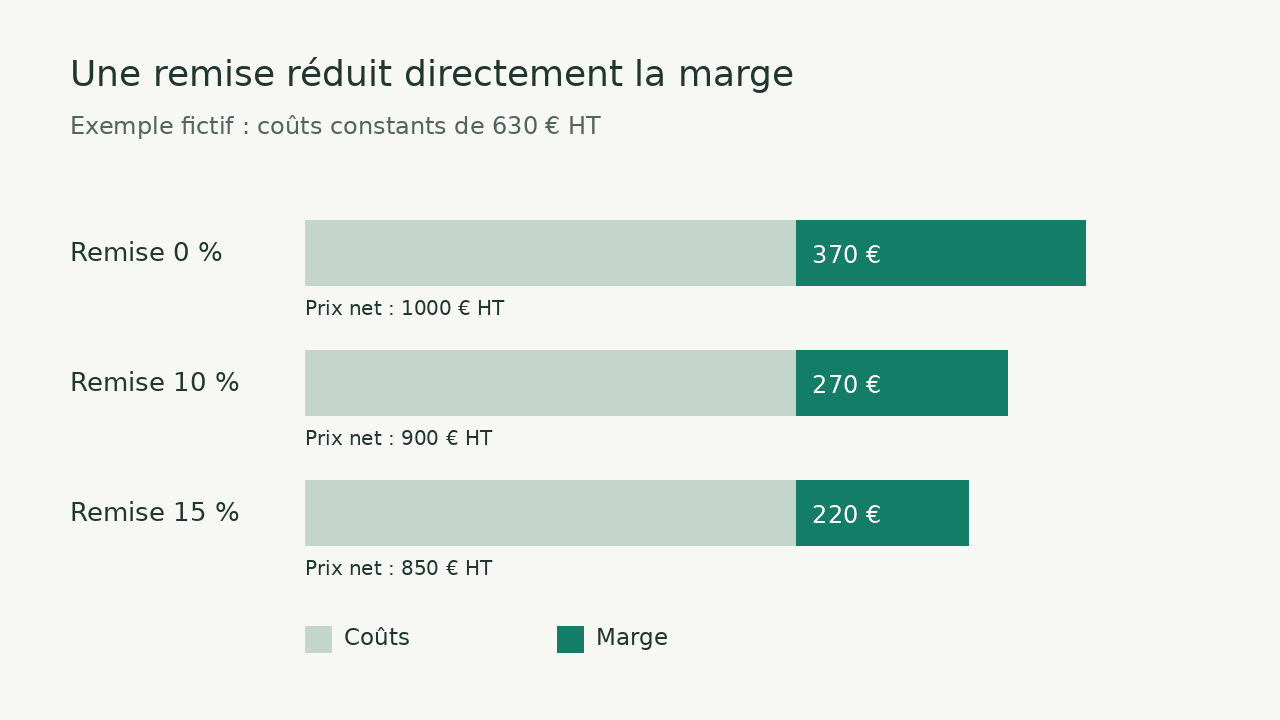
A 10% discount can remove much more than 10% of a quote’s margin. Before accepting it in Axonaut, enter the cost, calculate the proposed net price and choose the share of sales revenue you want to retain. In the example below, a quote of €1,000 excluding VAT with costs of €630 can support a maximum 10% discount while keeping a margin of 30% of the selling price.
Method: desk research using Axonaut’s help centre and illustrative Logicelio calculations with explicit assumptions, without testing a customer account.
Enter the cost before negotiating
Axonaut’s help centre states that a product or service can have a selling price and a cost. These two amounts feed the margin calculation when editing a quote or invoice. A discount can apply to one line or the whole quote, in euros or as a percentage.
For a purchased product, start with the cost expected for the relevant order. For a service, estimate the hours required and their internal cost, then add subcontracting and purchases directly associated with the assignment. Keep a consistent VAT-exclusive basis throughout the calculation. Non-recoverable VAT or a particular tax situation requires appropriate treatment with your accountant.
In the Product or Service record, enter both documented values before preparing the quote. On the quote, check quantities, discounts already granted and the net price. If you negotiate several lines, recalculate total costs and total sales after discount: averaging the percentages of individual lines can hide a loss-making service.
An illustrative quote of €1,000 excluding VAT
A small business quotes €1,000 excluding VAT for a service. It estimates labour at €400, subcontracting at €150 and purchases at €80, giving costs of €630. These costs remain unchanged in all four proposals. The margin shown is the net VAT-exclusive price minus these costs; unallocated overheads and income tax are outside the calculation.
| Discount | Net price excl. VAT | Included costs | Margin in euros | Margin / net price |
|---|---|---|---|---|
| None | 1 000 € | 630 € | 370 € | 37 % |
| 5 % | 950 € | 630 € | 320 € | 33,68 % |
| 10 % | 900 € | 630 € | 270 € | 30 % |
| 15 % | 850 € | 630 € | 220 € | 25,88 % |
With a 10% discount, you give up €100 of revenue and the same amount of margin: it falls from €370 to €270. The percentage reduction in margin therefore exceeds the discount expressed as a percentage of the original price. At 15%, the remaining €220 represents 25.88% of the €850 net price.
Calculate the floor price for your proposal
First define your target and its denominator. Here, “30%” means a margin equal to 30% of the net VAT-exclusive selling price. Calculate the floor price as: costs / (1 − target margin share). In this case: 630 / (1 − 0.30) = €900 excluding VAT. The maximum discount on the original €1,000 price is therefore (1,000 − 900) / 1,000 × 100 = 10%.
A 30% markup on cost produces a different result: 630 × 1.30 = €819 excluding VAT. The margin is then €189, or 23.08% of the selling price. To avoid confusing a markup on cost with a margin on sales, write the denominator in your negotiation note.
If the customer has a budget of €850 excluding VAT, the cost compatible with your 30% target becomes 850 × 0.70 = €595. You therefore need to reduce the scope or save €35 on expected costs, because 630 − 595 = €35. A price reduction without a change in costs leaves your target out of reach.
What project tracking adds after the sale
The quote’s margin remains a forecast. In projects, Axonaut’s help centre distinguishes revenue from associated invoices, allocated expenses and labour costs based on time recorded by team members. Those labour costs depend on the hourly cost entered for each user.
Use the same scope when reviewing the completed assignment. In this example, an additional €80 of work would raise costs to €710. On the accepted quote of €900 excluding VAT, margin would fall to €190, or 21.11% of the price. The useful check is then to explain the variance: extra time, a forgotten purchase or an underestimated starting cost.
Also check that the same labour cost is not counted once in the service cost and again in your own review spreadsheet. This guide’s method supports a discount decision; it replaces neither an income statement nor the VAT margin scheme applicable to certain activities.
Choosing Axonaut for this task
The official plan comparison consulted includes margin display and project tracking within the subscription’s feature scope. The subscription cost depends in particular on users and the selected term; activated external services can be billed separately. The amount in our example describes an illustrative customer quote, not Axonaut’s price.
Consider Axonaut if your team already connects products, quotes, invoices and projects. For a few isolated quotes, a spreadsheet using the same formulas may be sufficient. For manufacturing with complex costs or detailed analytical allocations, compare the requirement with a specialised tool before purchasing.
Partner link
Sources and method of this analysis
Axonaut: selling prices and costs for products and services ; Axonaut: quotes, line discounts and overall discounts ; Axonaut: expenses and labour costs in a project ; Axonaut: included features and external services Desk research and illustrative calculations using a fictional quote. Features are described from the official help centre; no Axonaut account or real quote was used. Sources consulted on 3 November 2026. Methodology · Trade transparency · Report correction.