Analysis of official documentation, with no testing on a paid account.
In this guide
- The starting rule: collected, excluding tax and without deducting expenses
- Close the period before looking at the total
- Worked example: four invoices, €1,800 to declare
- Resolve discrepancies before confirming
- What Freebe prepares and what you still need to decide
- Final check in five questions
- When this method is insufficient
Before confirming an Urssaf declaration in Freebe, start with the payments actually received during the period, then trace each receipt back to its invoice. An issued but unpaid invoice does not enter the period’s turnover. An invoice paid in instalments enters only for the amounts collected. If you charge VAT, use amounts excluding tax.
Documentary review of official Freebe, Urssaf and Service Public pages, without signing in to an account, submitting a declaration or creating a bank transaction.
The starting rule: collected, excluding tax and without deducting expenses
The micro-social scheme uses the revenue actually collected during the declared month or quarter. The official micro-social scheme overview explicitly distinguishes collected revenue from invoiced revenue. Urssaf also states that the declared amount excludes tax and that no expense may be deducted.
Your starting point is therefore neither the total of accepted quotes, nor the total of invoices dated within the period, nor the bank account balance. The correct scope is the sum of business payments actually received between the first and last day of the period, allocated to the corresponding activity category.
Close the period before looking at the total
- Record whether your deadline is monthly or quarterly and the two dates that bound the period.
- In Freebe, display the receipts for that period. Do not move a payment because the invoice has a different date.
- Match each bank transaction to the invoice, client and nature of the activity.
- List unmatched transactions, partial payments and apparent duplicates separately. They must be explained before confirmation.
- Compare the resulting total with the receipts ledger and the amount Freebe proposes to declare.
Freebe states that its bank synchronisation assigns transactions to invoices and clients. Its page about managing the receipts ledger states that receipts feed the documents available for viewing and export. These automations help with matching; they do not replace identifying an ambiguous transfer or an incorrect assignment.
Worked example: four invoices, €1,800 to declare
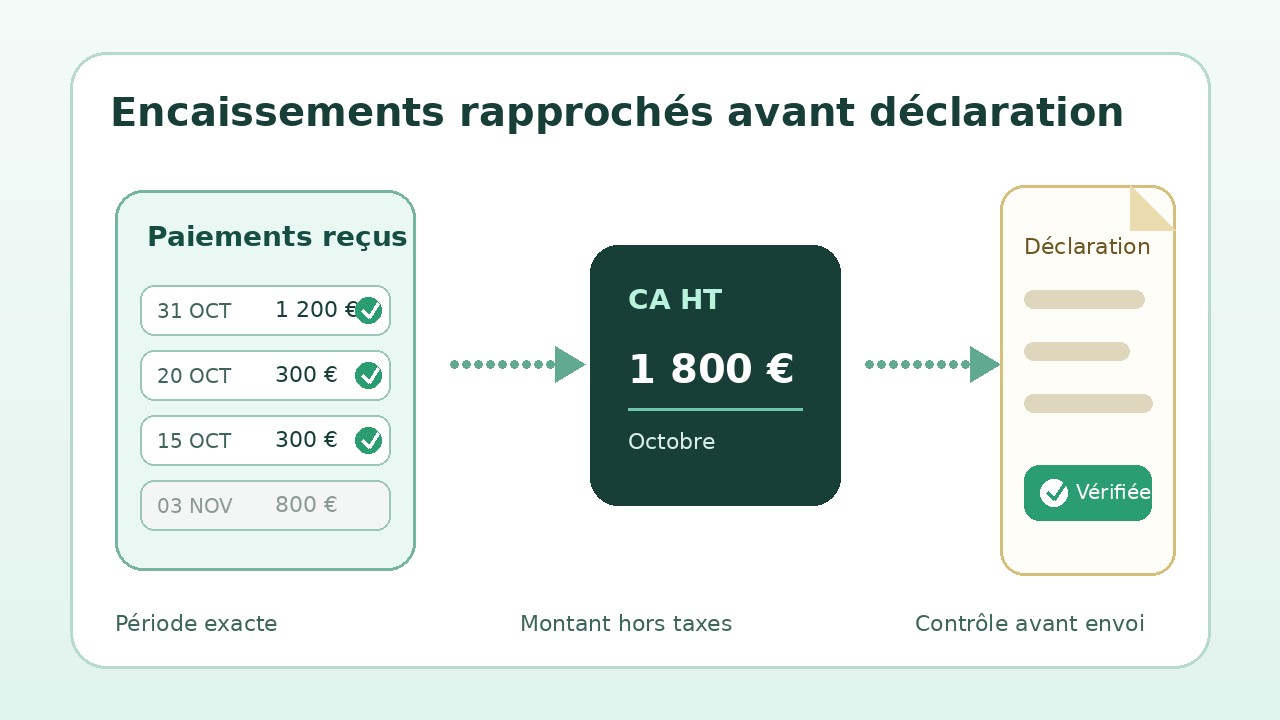
Hypothetical example: a micro-entrepreneur providing services prepares her October declaration. The amounts below exclude tax.
| Event | Amount | Amount included in October |
|---|---|---|
| Invoice A paid on 31 October | 1 200 € | 1 200 € |
| Invoice B issued on 28 October, paid on 3 November | 800 € | 0 € |
| Deposit received on 20 October | 300 € | 300 € |
| Invoice C paid €300 on 15 October, then €300 on 7 November | 600 € | 300 € |
| Turnover collected in October | 1 800 € | |
Invoice B waits until November despite its issue date. Only the first payment on invoice C counts. The deposit received is a receipt for the period. This reconstruction explains the total; it avoids confirming a figure calculated from invoices alone.
Resolve discrepancies before confirming
| Discrepancy | Check | Decision |
|---|---|---|
| Invoice issued, no payment | Confirm that no receipt occurred during the period. | Do not add it to the period’s turnover. |
| Partial payment | Compare the instalments with the payments received. | Include only the amount collected. |
| Transfer without a linked invoice | Identify the sender, purpose and corresponding document. | Correct the assignment before confirming. |
| Sales and service activities | Link each receipt to the correct type of activity. | Allocate the amounts to the appropriate Urssaf fields. |
| Fee or commission deducted | Find the gross amount paid by the client and the separate fee. | Do not deduct the expense from declared turnover. |
| VAT charged | Reconstruct the amount collected excluding tax. | Exclude VAT from declared turnover. |
A refund, a credit note collected earlier or a transaction that is difficult to classify requires a check suited to its date and nature. The table above does not replace reviewing the document or, when in doubt, obtaining an answer from Urssaf or your accountant.
What Freebe prepares and what you still need to decide
The official turnover declaration page states that Freebe displays the deadline, prepares the amount and asks you to confirm it before transmission to Urssaf. That confirmation is the right time to perform the reconciliation, rather than a formality to pass automatically.
The software can centralise invoices, receipts and the receipts ledger. Without a reliable assignment, it cannot guess that a transfer is a deposit, that a transaction is personal or that an activity was placed in the wrong field. Keep the Urssaf declaration receipt and the receipts ledger for the corresponding period so that you can explain the total later.
Final check in five questions
- Do the statement dates match the declared month or quarter exactly?
- Is every included receipt linked to a client, invoice or explanatory document?
- Are unpaid invoices and payments received after closing excluded?
- Are the amounts excluding tax, gross of fees and allocated by type of activity?
- Do the Freebe total, receipts ledger and your reconstruction reach the same amount?
If the three totals differ, do not confirm out of habit. Isolate the line causing the discrepancy, correct its assignment or document it. A zero declaration remains mandatory when the period contains no receipts.
When this method is insufficient
This guide covers the monthly or quarterly declaration of a micro-enterprise. A company, a business under the standard regime, an activity using an agent or a foreign-currency transaction may require different treatment. Bank synchronisation may also be incomplete or delayed: the temporary absence of a transaction in Freebe does not prove that no payment was received.
For more detail, review the Freebe review, the guide to profitability on a fixed-fee project and the method to check the balance before a reminder.
Partner link
Sources and method of this analysis
Freebe: prepare and confirm the turnover declaration ; Freebe: match bank transactions to invoices ; Freebe: maintain and export the receipts ledger ; Service Public: declare revenue actually collected ; Urssaf: declare collected turnover excluding tax Collection, turnover excluding tax and allocation rules are combined with Freebe features in a review method before confirmation. Sources reviewed on 2 November 2026. Methodology · Trade transparency · Report correction.