
In what case watch Benchmark Email?
Benchmark Email deserves a test if you are looking for an email campaign tool with automation and audience management.
In this review
Benchmark Email at a glance
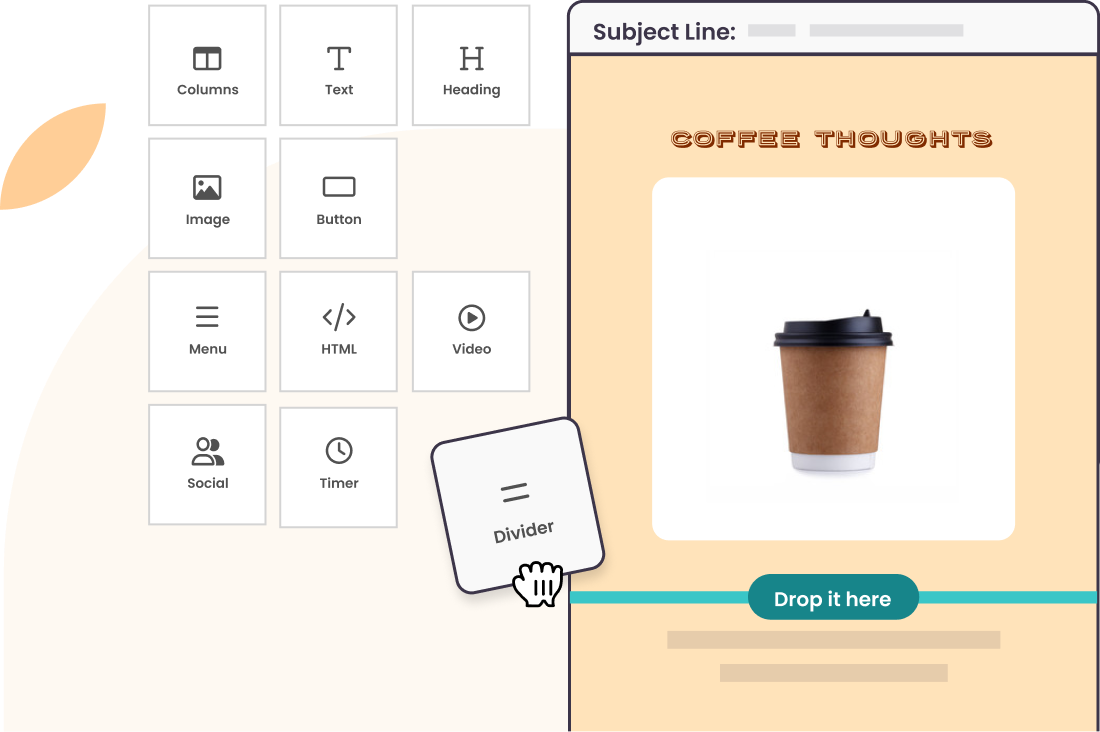
Benchmark Email interface: what this capture shows
Email editor Benchmark Email presented on the official website. Logicelio uses this capture as a visual cue to read with its "Newsletters, automations and email campaigns" positioning and the functions Creation and sending of campaigns, Segmentation and management of contacts, Automations and scenarios. This image is not a trial of the software.
The capture comes from an official Benchmark Email resource.
View Benchmark Email on the official website →
What to remember before choosing Benchmark Email
Benchmark Email deserves to be compared for a team that wants to prepare a campaign, select an audience and review the results. The documentary difficulty is the coexistence of pages with different generations of service. The correct perimeter is that of the account proposed today, not the sum of the functions found on all the old pages.
active contacts, email sends and additional access.
What Benchmark Email offers on a daily basis
The main pricing page lists 500 contacts and 2 500 email sends per month. Older help documentation still contains a different allowance. Use the limit stated in the plan you subscribe to and keep a copy of the quote; do not combine the benefits of several versions of the documentation.
A base of a few hundred people can quickly consume the quota if you add a boost and several editions. Estimate frequency, then list growth. The number of importable contacts is not the number of messages allowed.
Separate the origin, interest and recent activity of contacts. A useful segment makes it possible to adapt information, not only to multiply the variants of a message. Reread the criteria by another person to avoid too wide a selection.
Before importing the entire base, reproduce the form, useful fields and exclusions in a small trial game. Then control the export. If you depend on an old automation or connector, validate the course in the account version rather than rely on the brand name.
When this option makes sense
Who it is for: small teams that prefer a short newsletter circuit.
When to look at another approach: If you need complex routes, confirm their availability in the proposed product and plan. The old localized pages alone are not proof of access to current functions.
A small team sending out two monthly editions
Benchmark may be appropriate if the need remains focused on clear and regular campaigns. An activity whose sale depends on a series of automated conditions must first demonstrate this path in the proposed account; access to the vendor is not enough to validate this dependency.
Budget: compare the right scope
Benchmark Email budget: active contacts, email sends and additional access.
View offers from Benchmark Email →
Limits that may change your mind
If you need complex customer journeys, ask for confirmation that they are available in the proposed product and plan. Older localised pages alone do not prove access to current features. The main pricing page lists 500 contacts and 2 500 email sends per month. Older help documentation still contains a different allowance. Use the limit stated in the plan you subscribe to and keep a copy of the quote; do not combine the benefits of several versions of the documentation.
Three checks to see if Benchmark Email suits you
Prepare an internal sample newsletter and confirm that the account has the necessary functions for the next cycle.
- Define the scope
Record the plan name, contact limit, email sends and number of people who can work in the account.
- Reproduce an edition
Create a message with image, link and alternative text. Check its readability on the phone and the accuracy of the segment.
- Check continuity
Test unsubscribe and export, then the essential connector. Document the missing functions before transferring the actual hearing.
Benchmark Email facing the closest solutions
| Software | Positioning | Profile | Cost to watch |
|---|---|---|---|
| Benchmark Email this review | Creating campaigns and managing email contacts | small teams who prefer a short newsletter circuit | active contacts, email sends and additional access |
| AWeber | Collection of subscribers, newsletters and e-mail route | creators and small businesses that maintain a regular audience | the level of subscribers, the frequency of sending and the functions retained |
| Brevo | Email campaigns, automations and sales tracking with separate limits | small teams that assess campaign-day capacity, automation contacts and user access separately | same-day sending volume, contacts in automations and extra modules or user access |
| CleverReach | Newsletters with segmentation and automation depending on the plan | companies that want to adapt the subscription to their pace of communication | recipients, email sends and the level of automation |
See all alternatives to Benchmark Email →
Scope of the documentation
Benchmark Email pricing: no amount was recorded for this review.
Interface language: incomplete documentary verification.
No third-party test cited; documentary review only.
Sources used for this review
Documentary review of 27 September 2026. Differences between official pages are reported; no actual sending test is claimed.