
Who is this tool for?
A good fit if you want to organise campaigns, contacts and sequences with clearly quantified limits. The decisive factors are peak sending volume and required access. A campaign reaching more than 300 recipients on the same day exceeds Free’s daily quota; compare the plan matching that cadence.
Brevo can combine campaigns and contact tracking, but useful capacity depends on several separate counters. Storing an audience does not mean you can send a whole campaign to it on the same day. First establish peak sending volume, the contacts entering your sequences and the people who need account access.
Who it is for: small teams that assess campaign-day capacity, automation contacts and user access separately.
When to look at another approach: If your campaign must reach more than 300 recipients on the same day, the Free plan does not cover that cadence. If several people need account access or your automations exceed the contact limit, price the relevant plan and add-ons before choosing Brevo.
Features and everyday use
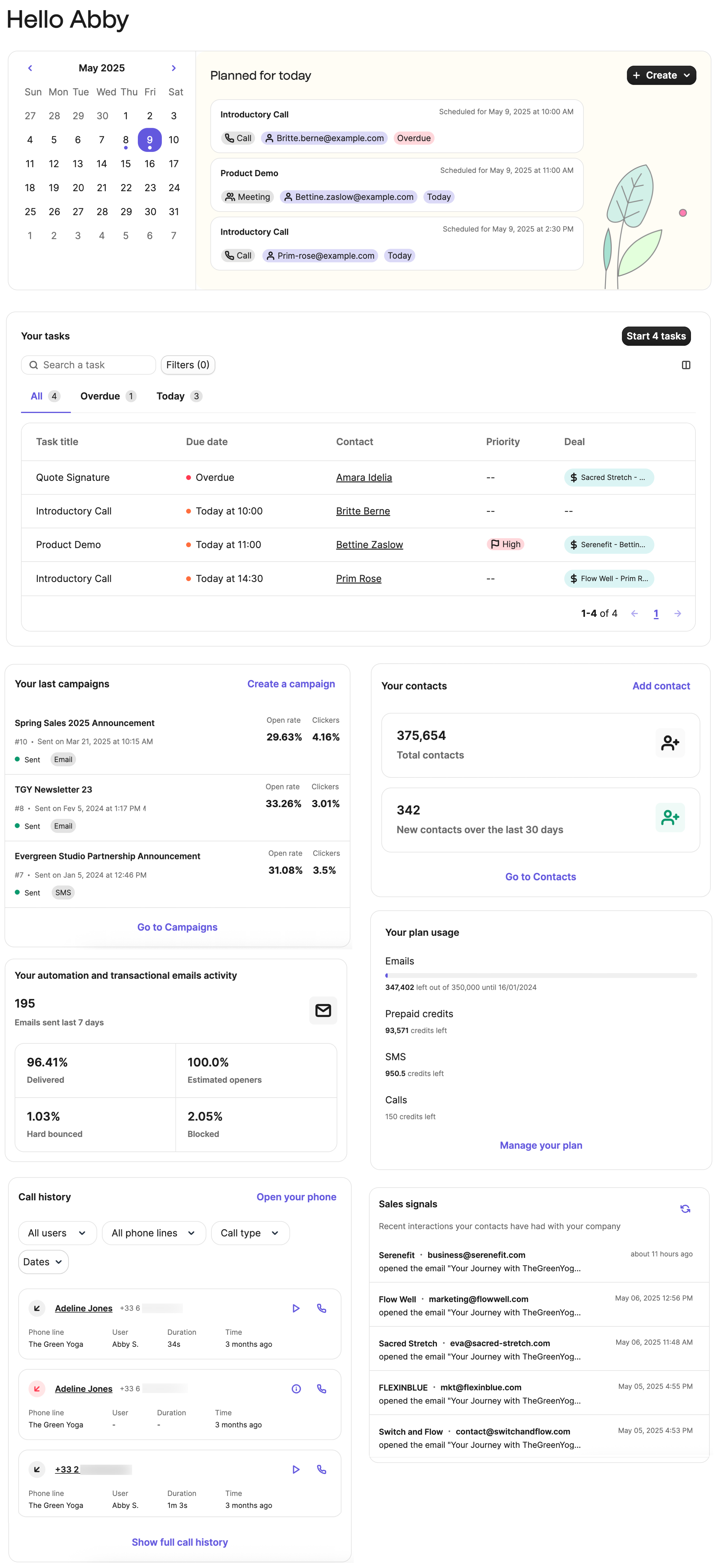
Official visual of Brevo: what it represents
The vendor source describes a customisable home page: contact tracking, plan usage and campaign shortcuts are separate widgets. This overview helps identify the counters to monitor; it shows neither the rules inside an open workflow nor whether a message was successfully sent.
The visual comes from an official Brevo resource.
The documentation distinguishes stored contacts from the Free plan’s daily limit of 300 emails. A campaign exceeding that quota requires manual requeueing after the limit resets. Averaging the volume over a month therefore does not solve a same-day sending requirement.
On Free, the limit of 2,000 unique contacts applies to entry into active automations. Once reached, new contacts cannot enter, while those already in the workflows continue. An automation remaining active therefore does not prove that new subscribers are joining it.
The vendor documents audience settings with exit conditions that can apply at any step and optional re-entry, including a possible waiting period. A welcome sequence and abandoned-cart sequence need different rules: the former may allow only one entry, while the latter may permit another entry after a new trigger.
According to the official help centre, Free is limited to one user, one pipeline and 50 open deals. Before moving a sales team into it, separate opportunity tracking from user access and Sales add-ons. Email volume alone does not price both requirements.
What to know about Brevo
- 01
The free offer is announced to 0 € with 300 emails per day and up to 100 000 contacts stored.
- 02
Starter starts at 7 €/month and Standard at 17 €/month according to the selected volumes.
- 03
Standard adds marketing automation with unlimited contacts, A/B testing, AI optimization of sending time and advanced analytics.
Pricing and terms
Price checked on 26 September 2026; check the current price before choosing.
Limitations to consider
The Free plan limits email sends to 300 per day, automations to 2 000 unique contacts and access to a single user. Starter retains the 2 000-contact automation limit; more marketing users require Standard with additional seats or Pro. For analytics, EmailToolTester also notes more limited reporting on lower tiers and no custom reports. Calculate the cost of your usage tier before moving a team or a large contact database.
Checks and examples
Illustrative example: a newsletter sent on the same morning
A small business wants to notify 600 customers about an event on Monday morning. Storing the contacts is not the limiting factor: Free’s daily quota requires batching. If receiving the message on Tuesday is still useful, the business can consider that arrangement; if Monday is essential, it must compare a tier covering same-day sending. This is an illustrative calculation, not a campaign run by Logicelio.
Three checks to see if Brevo suits you
Plan the busiest sending day, the number of contacts entering sequences and the access your team needs separately.
- Calculate the peak, not just the monthly total
List the planned campaign and the other messages expected that day separately. Compare their total with the applicable quota. If every recipient must be reached on the same day, manual batching is a trade-off that must be explicitly accepted.
- Define what stops each sequence
For each scenario, record the trigger, exit condition and re-entry permission. Check these three settings with internal contacts before real use. A reply or purchase may make further messages unnecessary even if the scheduled delay has not ended.
- Separate the quote’s capacity measures
Request separate costs for sending volume, automation contacts, users and Sales add-ons. Keep the agreed scope with the quote: raising one limit does not demonstrate that the other limits disappear.
Alternatives and guides
Brevo facing the closest solutions
| Software | Positioning | Profile | Cost to watch |
|---|---|---|---|
| Brevo this review | Email campaigns, automations and sales tracking with separate limits | small teams that assess campaign-day capacity, automation contacts and user access separately | same-day sending volume, contacts in automations and extra modules or user access |
| AWeber | Collection of subscribers, newsletters and e-mail route | creators and small businesses that maintain a regular audience | the level of subscribers, the frequency of sending and the functions retained |
| Benchmark Email | Creating campaigns and managing email contacts | small teams who prefer a short newsletter circuit | active contacts, email sends and additional access |
| CleverReach | Newsletters with segmentation and automation depending on the plan | companies that want to adapt the subscription to their pace of communication | recipients, email sends and the level of automation |
Sources and methodology
Original Test Title: Brevo Review 2026: The Cheap All-in-One Solution?
What EmailToolTester actually tested
This test was carried out by EmailToolTester, not by Logicelio. I cite it to provide a perspective based on actual use, without adopting its verdict as my own.
The protocol announced: Several years of real use, supplemented by campaign tests, automations, reporting and vendor.
The test appreciates value for money and automations, while reporting limitations on multi-user, live support and certain reports.
Read the original test on EmailToolTester ↗Desk research dated 30 October 2026 covering quotas, access and automation conditions. Logicelio did not use a Brevo account or send a campaign. Prices and other observations shown on this page retain their own dates.
- Brevo : official website ↗
- Brevo: Free plan limits ↗
- Brevo: audience entry, exit and re-entry conditions ↗
- Brevo: home page layout ↗
- Brevo: plan and add-on scope ↗
- Brevo: Official rates ↗
- Brevo: Offer Limits Free ↗
- Brevo: users and authorisations ↗
- EmailToolTester: Brevo 2026 ↗ test
- Brevo: ↗ interface languages
- Methodology Logicelio