
In what case watch ClickUp?
ClickUp is for small teams who wish to group multiple uses with an identified administrator. If no one can maintain the settings and train newcomers, the concentration of uses in the same space may create a dependency on the person who configured it.
In this review
ClickUp at a glance
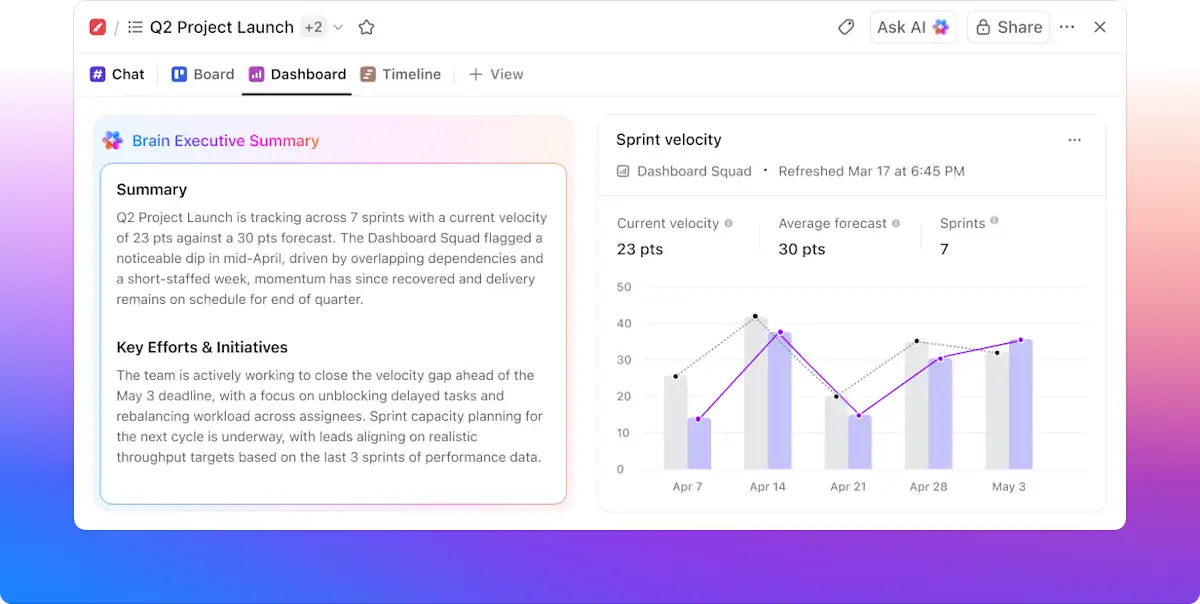
ClickUp interface: what this capture shows
Scoreboard ClickUp presented on the official Dashboards page. Logicelio uses this capture as a visual marker to read with its positioning "Management of tasks, documents and project views in a common workspace" and functions Tasks and projects, Docs, Dashboards. This image is not a trial of the software.
The capture comes from an official ClickUp resource.
View ClickUp on the official website →
What to remember before choosing ClickUp
ClickUp brings together many possibilities, but a small team must decide which ones it will actually use. A simple workspace, clearly understood statuses and a person responsible for settings are a better starting point than a collection of boards copied from templates. Choose the product if this consolidation reduces searching and duplicate entry in your own workflow.
Price checked on 26 September 2026; check the current price before choosing.
Original Test Title: ClickUp review
What ClickUp offers on a daily basis
Free Forever includes unlimited tasks and members, but only 60 MB of storage and one form. Upload a few files representative of the planned work before moving a complete archive. Mostly text-based tasks and work rich in visuals have different storage needs.
The aid specifies that users of the same workspace cannot be divided into different planes. The roles then determine the chargeable access. To prepare the budget, separate those who produce weekly from those who consult a one-time deliverable.
Unlimited extends the storage, forms and diagrams of Gantt; Business adds reporting and automation capabilities. Choose a missing observable function, then measure what it avoids. An additional view that is not used for any meeting or decision is primarily a screen to be maintained.
On Free, guests have full access to shared items. On paid offers, guests with permissions are subject to quotas; exceeding them may add a paid seat. Test the role from a separate account before sharing a business file.
What to know about ClickUp
- 01
Free Forever announces unlimited tasks and unlimited members, but only 60 Mo storage and form.
- 02
Unlimited is displayed at 7 $ per user/month in annual or 10 $ monthly on the grid consulted.
- 03
In the same Workspace, users cannot be divided into different planes.
When this option makes sense
Who it is for: small teams wishing to group several uses with an identified administrator.
When to look at another approach: If no one can maintain the settings and train newcomers, the concentration of uses in the same space may create a dependency on the person who configured it.
Example: a benefit team that wants to centralize everything
A small organisation may want to bring requests, writing and approval together in ClickUp. The risk is not only financial: if each assignment has its own statuses and conventions, covering for a colleague becomes difficult. Set a minimal template, then allow exceptions when they address a concrete constraint. The choice becomes defensible when it takes less time to understand a case, even for someone who did not create it.
Price: what you really need to budget
Limits that may change your mind
The plan is common to the workspace and some guests with permissions can lead to a paid seat beyond the quota. Free does not allow the same permission restrictions on shared items. Check role, access and billing together before inviting a customer. The help also distinguishes from limited uses of advanced functions that do not reset: therefore, a function available in your trial is not necessarily usable without time limits.
Sources of these limits
Three checks to see if ClickUp suits you
Follow an incoming request until it is delivered in a space that all employees understand.
- Voluntaryly limit settings
Create a list with three or four statutes defined in common language. Keep the fields that trigger an action. Ask each participant to handle a task without assistance.
- Control client sharing
Prepare a fictitious folder containing an internal note and a communicable deliverable. Check the exact shared scope and assigned role before any actual invitation.
- Taking stock of circumventions
After a short pilot period, take stock of the exchanges that remain out of the file, the information retrieved and the alerts ignored. Simplify these points before adding a new automation.
What TechRadar actually tested
This test was carried out by TechRadar, not by Logicelio. I cite it to provide a perspective based on actual use, without adopting its verdict as my own.
Old Source: this test dates from the 25 January 2024 and exceeds the editorial threshold of 24 months. The product may have evolved.
The protocol announced: Testing the interface, document management functions, project and collaboration.
TechRadar judges ClickUp very versatile and customizable, but notes a sometimes complex configuration and an important learning curve.
Read the original test on TechRadar ↗ClickUp facing the closest solutions
| Software | Positioning | Profile | Cost to watch |
|---|---|---|---|
| ClickUp this review | Task, document and project view management in a shared workspace | small teams that want to bring several uses together with a designated administrator | the workspace seats, guest access, AI options and configuration |
| Asana | Task and deadline management across multiple projects | teams whose deliveries depend on shared responsibilities and deadlines | the paid members, level of management features and additional options |
| GanttPRO | Visual planning centred on a Gantt chart | managers who need to explain the sequence of project stages | the selected team size, plan and workload management needed |
| Nozbe | Organisation of tasks and discussions linked to projects | small teams that want to find discussions alongside the work to be done | the Premium users, active projects and history retention |
See all alternatives to ClickUp →
Sources used for this review
ClickUp: documentary record of the 27 September 2026. The scenarios are proposed for your evaluation; they are not results of tests performed by Logicelio.