
In what case watch Nozbe?
Nozbe is for small teams who want to get back to the work to be done. If you are looking primarily for complex dependency planning or a large financial portfolio, start by confronting these requirements with a specific demonstration rather than a simple task list.
In this review
Nozbe at a glance
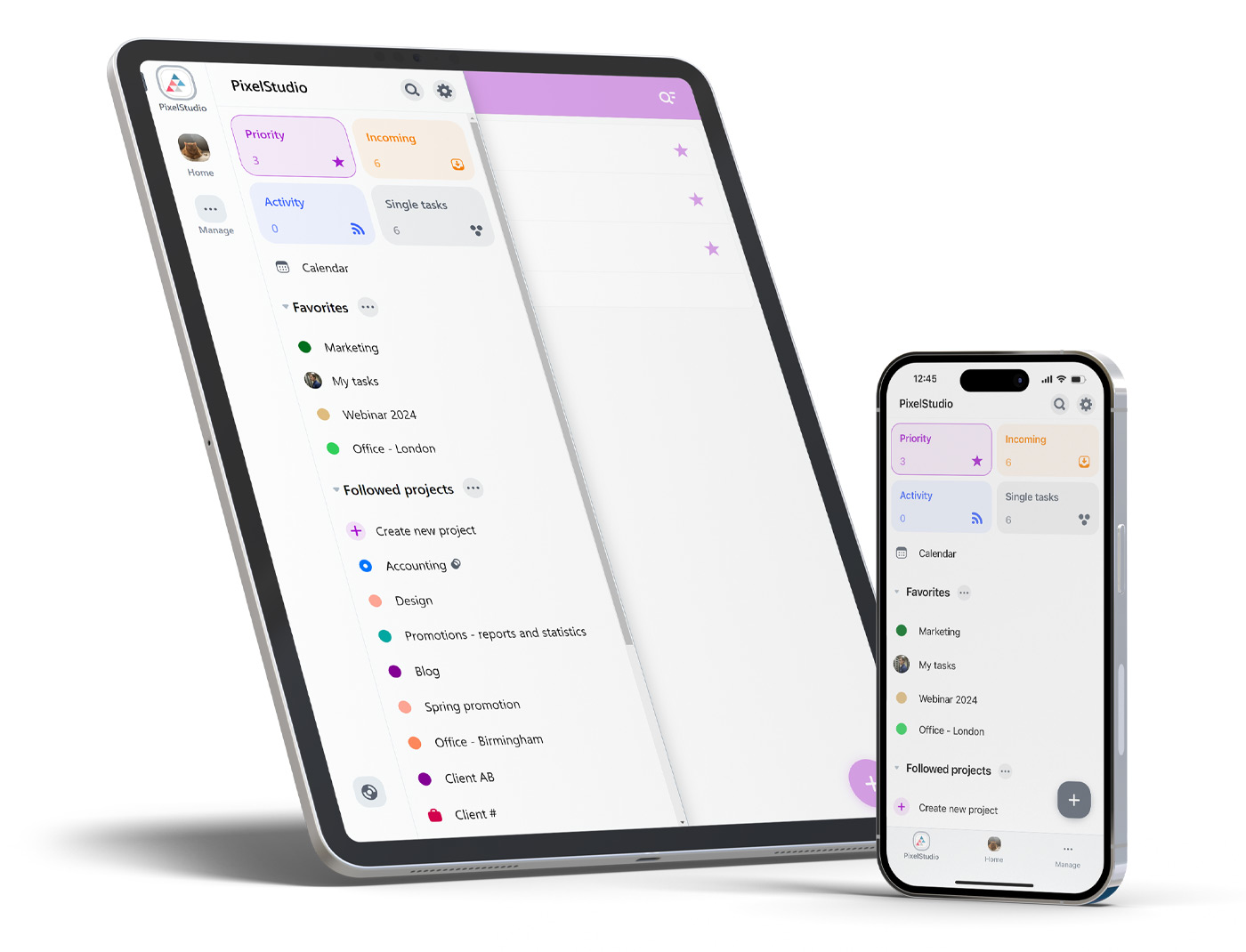
Nozbe interface: what this capture shows
Task management interface presented by Nozbe. Logicelio uses this capture as a visual cue to read with its positioning "Organization of tasks and discussions related to projects" and functions Projects, tasks and responsibilities, Views, planning and prioritization, Collaboration, comments and documentation. This image is not a trial of the software.
The capture comes from an official Nozbe resource.
View Nozbe on the official website →
What to remember before choosing Nozbe
Nozbe is a track for releasing decisions from scattered long conversations and linking them to tasks. For a small team, the challenge is to know where to ask for precision, where to announce a blockage and when to consider an action as complete. A voluntary product focused on this operation is especially suitable if the team agrees to move its exchanges to the relevant files.
Premium users, active projects and historical preservation.
What Nozbe offers on a daily basis
Free includes one workspace, three active projects and three members. Tasks and comments are unlimited within that scope. Define what your team calls a project: an ongoing client, an assignment and a campaign produce different numbers of open records.
The free plan limits completed-task history to seven days and storage to 500 MB, with 10 MB per file. An organisation that reviews decisions several weeks after delivery should account for that need before migrating.
Premium lists unlimited projects and history, plus 20 GB of storage per user. Pricing depends on the number of people and the selected billing arrangement. The dynamic price could not be recorded reliably here: confirm the exact configuration instead of relying on a technical zero displayed without context.
Nozbe's proposal combines tasks and comments. Set a practical rule: a decision that changes the expected result must appear in the file. A quick message may remain useful, but it should not be the only place where the team learns that a priority has changed.
When this option makes sense
Who it is for: small teams who want to return to the work to be done.
When to look at another approach: If you are looking primarily for complex dependency planning or a large financial portfolio, start by confronting these requirements with a specific demonstration rather than a simple task list.
Example: a structure that works mainly through messages
A team of three can lose time finding the latest instruction in its conversations. The first pilot should focus on recurring decisions, not every company case. Assign an action to each request and keep clarifications together in its discussion. If people still duplicate conversations everywhere, simplify the communication rule before increasing the number of projects or users.
Budget: compare the right scope
Budget Nozbe: Premium users, active projects and historical preservation.
Limits that may change your mind
Free of charge limits active projects and the depth of history. Ensure that decisions remain accessible for the duration of your activity. The dynamic Premium rate is to be confirmed for the number and duration of engagement chosen. The documented backup contains only projects accessible to the person requesting it, even if they have the space. Select explicitly the CSV attachments and files to include, and then control the archive perimeter.
Sources of these limits
Three checks to see if Nozbe suits you
Address three active missions by keeping decisions and questions with their tasks.
- Define the project boundary
Take this week’s work items and group them by expected outcome. Check whether three active projects reflect your organisation or force unrelated topics together.
- Resuming a colleague's work
Choose a task containing a question, an attachment and a decision. Ask another person to continue it without consulting your email. Note which information they cannot find.
- Control the need for archives
List the decisions you must be able to justify after closing. Check the retention and export capabilities this requires, then compare them with the plan under consideration.
Nozbe facing the closest solutions
| Software | Positioning | Profile | Cost to watch |
|---|---|---|---|
| Nozbe this review | Organisation of tasks and discussions linked to projects | small teams that want to find discussions alongside the work to be done | the Premium users, active projects and history retention |
| Asana | Task and deadline management across multiple projects | teams whose deliveries depend on shared responsibilities and deadlines | the paid members, level of management features and additional options |
| ClickUp | Task, document and project view management in a shared workspace | small teams that want to bring several uses together with a designated administrator | the workspace seats, guest access, AI options and configuration |
| GanttPRO | Visual planning centred on a Gantt chart | managers who need to explain the sequence of project stages | the selected team size, plan and workload management needed |
See all alternatives to Nozbe →
Scope of the documentation
Nozbe pricing: no amount was recorded for this review.
Interface language: incomplete documentary verification.
No third-party test cited; documentary review only.
Sources used for this review
Nozbe: rate documentation read the 27 September 2026. No subscription has been subscribed; the Premium price is to be confirmed for the actual workforce.