Is Wondershare Filmora worth a visit?
Filmora is worth trying if you want to produce videos regularly without installing a complex post-production suite. Test a real project through to export: ease of editing matters, but watermark conditions, usable resources and the cost of AI features are decisive.
In this review
Wondershare Filmora at a glance
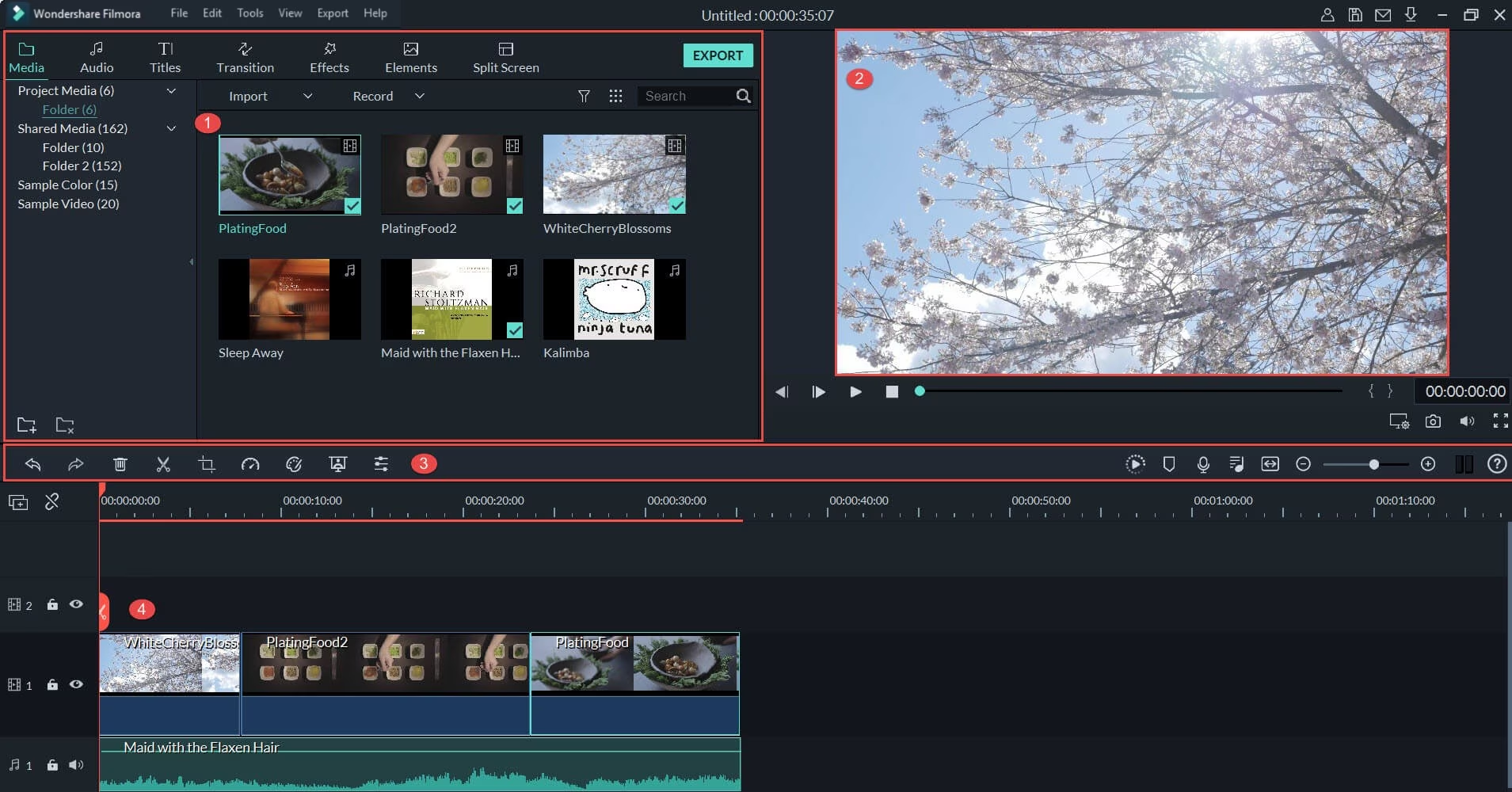
Wondershare Filmora interface: what this capture shows
Editing interface published in the official Filmora guide. Logicelio uses this screenshot as a visual reference alongside its positioning as “Accessible video editing with assisted creation features” and its Timeline editing, Subtitles and AI tools, and Creative resources features. This image does not constitute a test of the software.
The capture comes from an official Wondershare Filmora resource.
Filmora: free trial, exports with a watermark →
Partner link
What to remember before choosing Wondershare Filmora
Assess Filmora against the edited videos you actually need to deliver: the Avancé and Premium subscriptions and the perpetual licence do not provide the same AI credits, resources or upgrades. An entry price alone hides these differences.
Price checked on 26 September 2026; check the current price before choosing.
What Wondershare Filmora offers on a daily basis
Filmora offers cutting, titles, transitions, audio and visual settings. Reproduce a format that you actually publish rather than a short demonstration.
The vendor features assisted creation and captioning functions. Check the quality in French, the correction time and any credits required.
Models, effects and media can accelerate production. Check the commercial rights and limits of each form before publishing.
Test the final format, resolution, watermark of the trial version and project recovery if you change the tool.
What to know about Wondershare Filmora
- 01
The Avancé plan is listed at €49.99 per year with automatic renewal, and Premium at €79.99 per year. The pricing table lists 1,000 monthly AI credits for Avancé compared with 2,000 for Premium.
- 02
The perpetual licence covers Filmora 15, not all future versions; the AI credits shown for this plan are a one-off allocation, unlike the monthly quotas included with subscriptions.
- 03
At checkout, a separate Creative Resources trial with automatic renewal may be selected. Check that option and the final cost before paying, then export a sample project in 4K to assess the workflow.
When this option makes sense
Who it is for: Independents and small teams producing videos, tutorials and social content.
When to look at another approach: The free trial adds a watermark to the exported videos. To deliver without this marking, plan an appropriate license and verify resource rights. For advanced calibration or a highly collaborative pipeline, compare a specialized solution. The partner link opens Filmora's Windows page; check compatibility with your system before you...
Filmora: separating license, resources and credits AI
A simple video mounted from your own plans and a video generated with multiple times AI do not consume the same budget. Before purchase, describe your deliverable and separate the software license, creative resources and uses AI. "Perpetual" does not mean that all these components will be included forever.
What the vendor documents
Documentation consulted on
Wondershare distinguishes between a subscription that gives access to updates during its active period and a perpetual purchase for a specified major version. Future major versions are not automatically included in the latter.
Filmora: subscription and perpetual purchase ↗The official credits page gives different validity periods depending on their source: 30 days for subscription credits, no expiry for credits from a perpetual purchase and one year for a purchased pack. Recheck the rules for the specific offer you choose.
Filmora: Origin and validity of credits ↗
Previous editorial version: .
| Your situation | Key point to check | Decision proposed by Logicelio |
|---|---|---|
| Occasionally mount your own shots | The version covered, operating system, watermark-free export and features needed for the project. | Compare perpetual purchase to subscription without valuing AI functions you don't need. |
| Produce regularly with generation AI | Functions used, appropriations per operation, possible recoveries and expiry dates. | Build a generation envelope with a reserve for repeats; do not confuse available credits with available videos. |
| Use music and models for customers | Commercial licensing of resources, basket options and separate renewals. | Verify rights for the media you deliver; the editing licence does not establish the rights to every resource. |
Preparing a control project without inventing a cost per video
Choose a short, representative sequence with voice, subtitles and a shot to replace. Record which actions use your files and which invoke an AI feature. For the latter, record the stated counter before starting and the result after each attempt. The acceptable number of retries depends on the deliverable, not just the video length. This exercise remains for the reader to carry out; Logicelio publishes no measured performance figure here.
Keep source media, project and export in the format requested by the client. Check playback, sound and subtitles on another device. Before paying, reread the basket summary by separating services that renew. Do not use a monthly quota as an annual reserve: expired credits cannot fund a campaign several months later.
Filmora may suit everyday editing if exporting and reopening projects meet your needs. Production that depends on AI generation also requires usage tracking and rights to the resources. Compare the cost of the complete workflow without presenting the licence price as a guaranteed cost per video.
Price: what you really need to budget
Limits that may change your mind
The vendor offers a trial and several plans; check export conditions, AI credits and asset rights for the plan you actually buy. The verified entry price is 49,99 €/year excluding VAT (Plan Avancé, automatic renewal). Filmora aims to make editing accessible; for demanding post-production, also check trial limitations, export conditions, AI credits and the rights attached to the assets used. Test a real deliverable through to export, then check AI credits, usage rights, final quality and whether you can continue the work elsewhere.
Sources of these limits
Three checks to see if Wondershare Filmora suits you
For Filmora, use the rushes of a really published format: correction of subtitles, credits AI, licensed media and final export must enter into the selection.
- Editing and French subtitles
Mount an extract with cut, title and audio. Check the proper names in the subtitles and necessary corrections before broadcast.
- Creative credits and resources
Identify transactions that consume AI credits. Check the rights of the selected effects or media and any subscription to Creative Resources.
- Export and renewal
Check resolution and watermark of the exported file. Distinguish the renewable subscription of the perpetual licence limited to a major version.
Wondershare Filmora facing the closest solutions
| Software | Positioning | Profile | Cost to watch |
|---|---|---|---|
| Wondershare Filmora this review | Accessible video editing with assisted creation features | Self-employed professionals and small teams producing videos, tutorials and social content | Subscription, renewal, AI credits and rights to resources |
| Descript | Audio and video editing based on transcription | creators of interviews, podcasts and spoken content | media processed, credits AI and production access |
| InVideo | Video creation assisted by AI and content editing | creators who want to produce variants by controlling their generation budget | models, duration, actors and operations consuming credit |
| VEED | Online video creation and editing with captioning and tools AI | teams that produce short videos and social declinations | accesses, AI functions, captioning and export quality |
See all alternatives to Wondershare Filmora →
Scope of the documentation
Interface language: incomplete documentary verification.
No third-party test cited; documentary review only.