
Is Pipedrive worth considering?
Yes if you recognize yourself here: commercial teams wanting a very operational pipeline. CRM oriented commercial pipeline. Less suitable for: companies first looking for an all-in-one marketing suite. In this case, look at an alternative of the same category.
In this review
Pipedrive at a glance
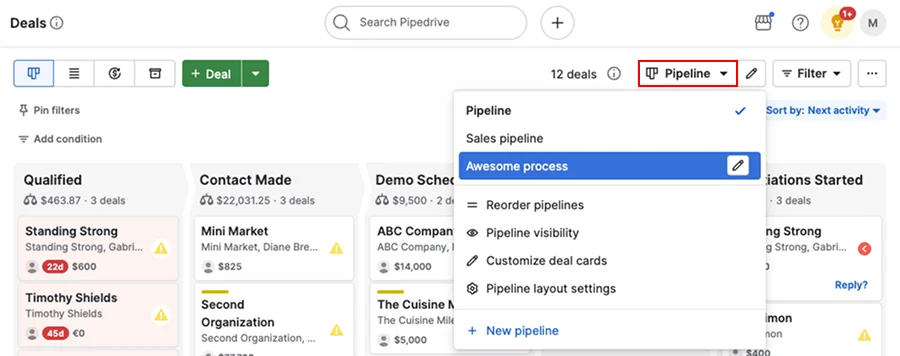
Official visual of Pipedrive: what it represents
Official Pipedrive Pipeline view. This is an official product visual, distinct from an interface screenshot. Logicelio relates it to the product’s positioning, “Sales pipeline-focused CRM”, and to these features: a visual pipeline; activity management; and email and synchronisation, depending on the plan. It makes no claims about elements that are not visible in the image.
The visual comes from an official Pipedrive resource.
View Pipedrive on the official website →
What to remember before choosing Pipedrive
Pipedrive remains very focused on the commercial pipeline; switching from Lite to Growth is particularly important if email synchronization and automation are at the heart of the sales process.
Price checked on 12 October 2026; check the current price before choosing.
Title of test cited: Pipedrive CRM: Hands-on testing - I can't believe how easy it is to navigate
What Pipedrive offers on a daily basis
Define the criteria for crossing between steps before importing business. Add a sent proposal, a lost folder and a prospect that is still unqualified to check their place. The pipeline must represent the commercial work in progress, without turning every contact into a potential sale.
Each active case should be able to recover the next action, its manager and its deadline. Prepare a deferred call and an absence to verify the resumption by a colleague. A completed schedule is useful only if priorities and files without follow-up remain visible.
For email synchronization, consider linking an exchange to the right contact and business. Check for messages visible to colleagues, rights and behaviour after disconnection. This monitoring function should not be confused with sending a newsletter.
Start with a simple follow-up or assignment, then observe what happens when the status changes. For reports, check how dates, amounts and lost deals are counted. A convincing table may still mislead if salespeople use the stages differently.
What to know about Pipedrive
- 01
Lite covers prospects, business, contacts, calendar and pipeline. Its price is indicated by item: the budget increases with each commercial added.
- 02
Growth adds full email synchronization, opening tracking, automation and re-launch sequences. These functions justify the change of plan only if the team uses them.
- 03
Pipedrive offers a free trial of 14 days without card and indicates more 500 integrations on the Lite plan.
When this option makes sense
Who it is for: commercial teams wanting a highly operational pipeline.
When to look at another approach: Companies first looking for an all-in-one marketing suite.
Price: what you really need to budget
Limits that may change your mind
Pipedrive stands out as straightforward and effective for managing a sales pipeline; marketing features are more limited, and several advanced options increase the cost. The verified entry price is 14 € excluding VAT/seat/month (Lite, annual billing: 168 € excluding VAT/year). Pipedrive focuses on the sales pipeline; an organisation primarily seeking a large marketing suite, CMS and customer service system will need to add other products. Test the pipeline, user permissions, automation and marketing modules you actually need before adding licences.
What the starting price leaves out
The additional cost to estimate
Pipedrive charges each seat, even if not allocated. LeadBooster, Projects and Smart Docs are included on Premium and Ultimate, but pay on Lite and Growth. Campaigns and Web Visitors remain supplements on all levels. The cost depends on the seats, options and volumes selected.
Verified the 12 October 2026 · Official source ↗
What you can export
Pipedrive can export most CRM objects in CSV or XLSX: leads, business, organizations, people, products, activities, projects, notes and files. However, related activities, notes and files must be exported separately from business and contacts.
Verified the 21 September 2026 · Official source ↗
The upgrade that makes a difference
Smart Docs is included on Premium and Ultimate, but remains an add-on on Lite and Growth. Projects follow the same logic: included from Premium, paying per seat on Lite and Growth.
Verified the 21 September 2026 · Official source ↗
Dependencies to consider
Smart Docs uses connected cloud storage (Google Drive, Microsoft OneDrive or SharePoint) to create and manage documents. If your quotes and contracts depend on this function, this third-party ecosystem is part of the choice.
Verified the 21 September 2026 · Official source ↗
Three checks to see if Pipedrive suits you
For Pipedrive, follow a case and its next activities. The challenge is to distinguish the Lite pipeline from the email and automation functions of higher levels.
- Case and next activity
Create a prospect, a business and a date activity. Take the matter forward in the pipeline and ensure that the next action remains identifiable.
- Communication synchronisation
Connect a demonstration inbox if your plan allows it. Check how emails are linked to deals and whether a second salesperson can see them.
- Licences and reports
Build the budget around the number of seats and the modules required. Try a tracking report, then check which columns are available in the export.
What TechRadar actually tested
This test was carried out by TechRadar, not by Logicelio. I cite it to provide a perspective based on actual use, without adopting its verdict as my own.
The protocol announced: Dozens of hours creating pipelines, importing leads and testing automation.
Pipedrive stands out as very simple and efficient for the commercial pipeline; marketing functions remain more limited and several advanced options increase the cost.
Read the original test on TechRadar ↗Pipedrive facing the closest solutions
| Software | Positioning | Profile | Cost to watch |
|---|---|---|---|
| Pipedrive this review | Sales pipeline-focused CRM | sales teams seeking a highly practical pipeline | the users and additional modules |
| Capsule CRM | A relationship book related to opportunities and projects | small service teams who want to follow the next commercial actions | users, the level of commercial tracking and the possible marketing module |
| monday CRM | A CRM configurable around tables and business processes | teams with a manager to maintain their business organization | the purchased seat tier, the CRM plan and action volumes |
| Zoho CRM | A structural CRM with modules, automations and differentiated roles | teams whose trade rules are sufficiently precise to justify an ongoing configuration | editing the organisation, user types and advanced functions required |
See all alternatives to Pipedrive →