
In what case watch Taiga?
Taiga is for teams who can organize a backlog and want to choose their hosting mode. If no one can maintain a server, self-hosting should not be considered an automatic economy. Compare the hosted service with the time and support required for your own installation.
In this review
Taiga at a glance
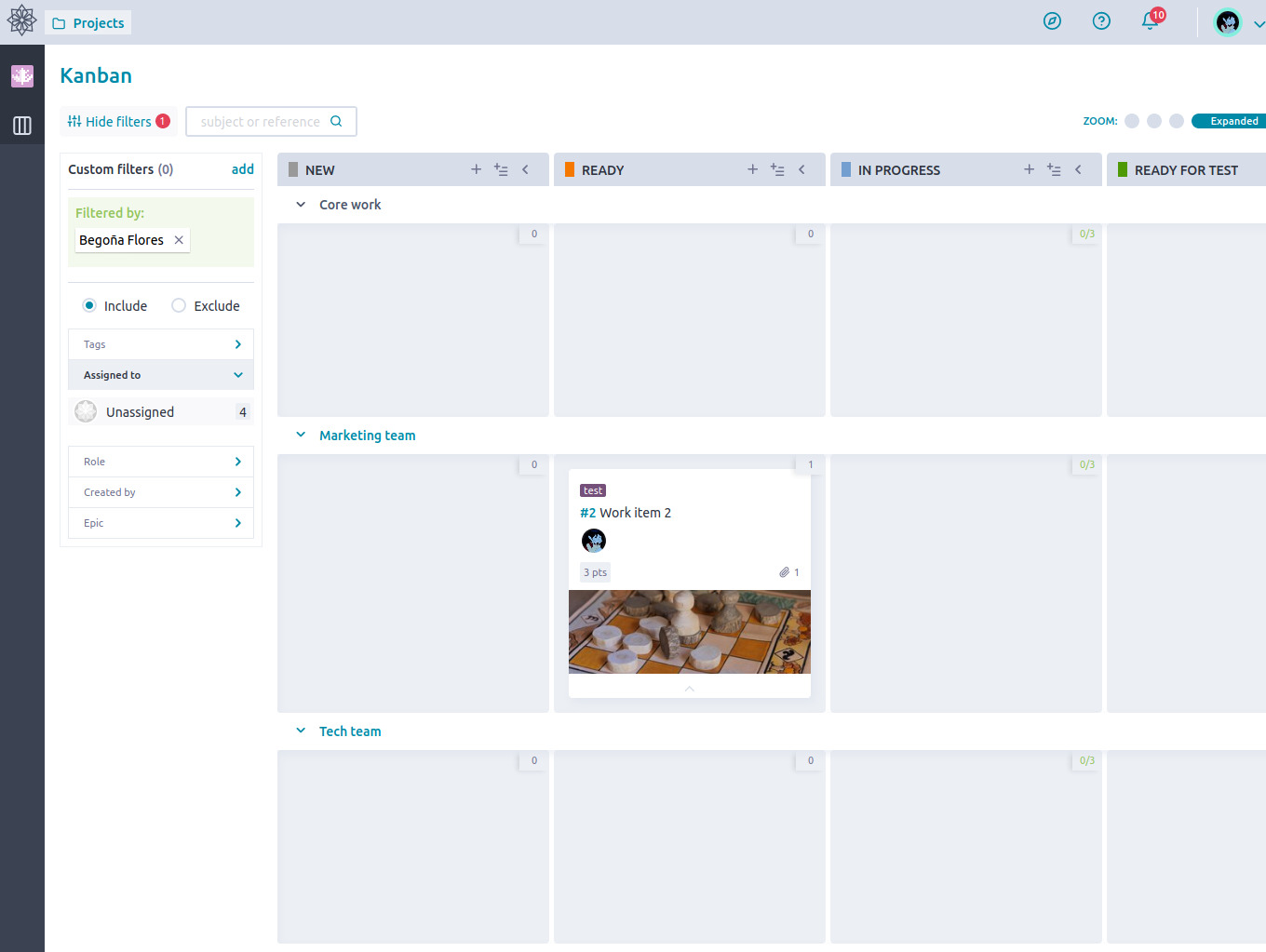
Taiga interface: what this capture shows
Kanban Taiga with filters published by the team in the official community. Logicelio uses this capture as a visual cue to read with its positioning "Agile project management with Kanban, Scrum and anomalies monitoring" and functions Projects, tasks and responsibilities, Views, planning and prioritization, Collaboration, comments and documentation. This image is not a trial of the software.
The capture comes from an official Taiga resource.
View Taiga on the official website →
What to remember before choosing Taiga
Taiga responds to an agile management need: order requests, track their progress and decide what goes into the next work period. Its open source character opens a choice of hosting, but does not remove operating responsibilities. For a small structure, the first decision is therefore both organizational and technical: who holds the backlog and who ensures the functioning of the service?
Price checked on 27 September 2026; check the current price before choosing.
What Taiga offers on a daily basis
Taiga documents columns, working limits and processing corridors. Define what allows a request to change step. A table becomes useful when it shows a blockage; moving a map to give an impression of progress does not inform about the result.
The product offers backlog, sprint planning and progression tracking. Start with a period of time and an expected result. Do not turn an estimate into a commercial promise until the team knows how to deal with unforeseen events.
The plans page limits Free to one public project, one private project and 10 MB of storage, with unlimited users. Check attachment capacity early. Do not make a client record public simply to work around a quota.
The official guide proposes a Docker installation and assumes knowledge of its administration. Responsibility goes beyond booting: access, backups, updates and restoration must be assigned. Software accessible from your server alone is not proof of continuity of service.
When this option makes sense
Who it is for: teams who know how to organize a backlog and want to choose their hosting mode.
When to look at another approach: If no one can maintain a server, self-hosting should not be considered an automatic economy. Compare the hosted service with the time and support required for your own installation.
Example: a small team produces
A team constantly receiving new ideas can use a backlog to separate requests from commitments. The benefit comes from explaining why a request is waiting and what makes it ready to handle. Choosing Taiga must support this discipline. Self-hosting may address a specific constraint, but it needs an operating budget separate from product development time.
Price: what you really need to budget
Limits that may change your mind
The free cloud storage limit requires distinguishing request tracking from attachment storage. Self-hosting makes you responsible for operation and backups; it is not equivalent to a free managed service. The Docker guide assumes administration skills and a properly configured instance. Before choosing this route, assign updates, restoration and support to someone available, then calculate the cost of this work and hosting.
Three checks to see if Taiga suits you
Priorize a backlog, process an anomaly and verify the operating responsibilities according to the selected hosting.
- Making a request testable
Write a request with its user, the expected result and the acceptance condition. Make it read by the person who will perform the work before giving it an estimate.
- Introduce an unexpected
Add an urgent anomaly in an already planned period. Agree to what is withdrawn or postponed and keep the decision. The table must explain the arbitration, not mask the overload.
- Check service resumption
For self-hosting, request a restore in a test environment. For the hosted plan, check export options and the scope of support. In both cases, identify the person who would step in during your absence.
Taiga facing the closest solutions
| Software | Positioning | Profile | Cost to watch |
|---|---|---|---|
| Taiga this review | Agile project management with Kanban, Scrum and issue tracking | teams that know how to organise a backlog and want to choose their hosting method | the hosting, storage, administration and support |
| Asana | Task and deadline management across multiple projects | teams whose deliveries depend on shared responsibilities and deadlines | the paid members, level of management features and additional options |
| ClickUp | Task, document and project view management in a shared workspace | small teams that want to bring several uses together with a designated administrator | the workspace seats, guest access, AI options and configuration |
| GanttPRO | Visual planning centred on a Gantt chart | managers who need to explain the sequence of project stages | the selected team size, plan and workload management needed |
See all alternatives to Taiga →
Scope of the documentation
Interface language: incomplete documentary verification.
No third-party test cited; documentary review only.
Sources used for this review
Taiga: file based on official sources consulted 27 September 2026. No instance has been set up or audited in this review.