Create the deposit from the estimate, then take the amounts back to the balance
In Indy’s web version, create a deposit invoice from a quote marked as signed. Then create the balance invoice from that quote to include the deposit invoices already issued. To correct an approved invoice, follow Indy’s documented credit-note procedure.
Analysis of official documentation, with no testing on a paid account.
Indy’s published invoicing procedures were consulted on 29 September 2026 for this guide. This is not a report of a trial in a client’s account. We provide a checking method and a fictional numerical example, without determining the tax treatment specific to your business. The Indy review presents the software as a whole.
In this guide
- Prepare the file before requesting a deposit
- Example: 1 500 € excluding VAT, two instalments, one balance
- Correct an invoice: read the entire chain
- An imported invoice does not have the same route
- Mark as paid only after verifying payment
- What to check before adopting this operation
- References and scope of this guide
Prepare the file before requesting a deposit
Collect the accepted quote, customer billing identity, delivery details and agreed timelines. Write separately what falls under the contract and what falls under the software. Have the client confirm any changes to the perimeter before creating the invoice. Keep track of this agreement before changing the amounts or benefits.
The official advance payment procedure from a quote marked as signed. The down payment invoice is created from this estimate; the balance invoice then takes back its data and the down payments issued. On the record, this creation is reserved for the web version, not the mobile application. So provide access to the browser before promising an immediate document from your phone.
A freelancer working on site can prepare the information there and finalise it at the office. A service provider who invoices after a video call can reserve that time for approval. In both cases, decide who performs the final check and who sends the document. Otherwise, two people working on the same case in parallel may send two different versions to the customer.
Example: 1 500 € excluding VAT, two instalments, one balance
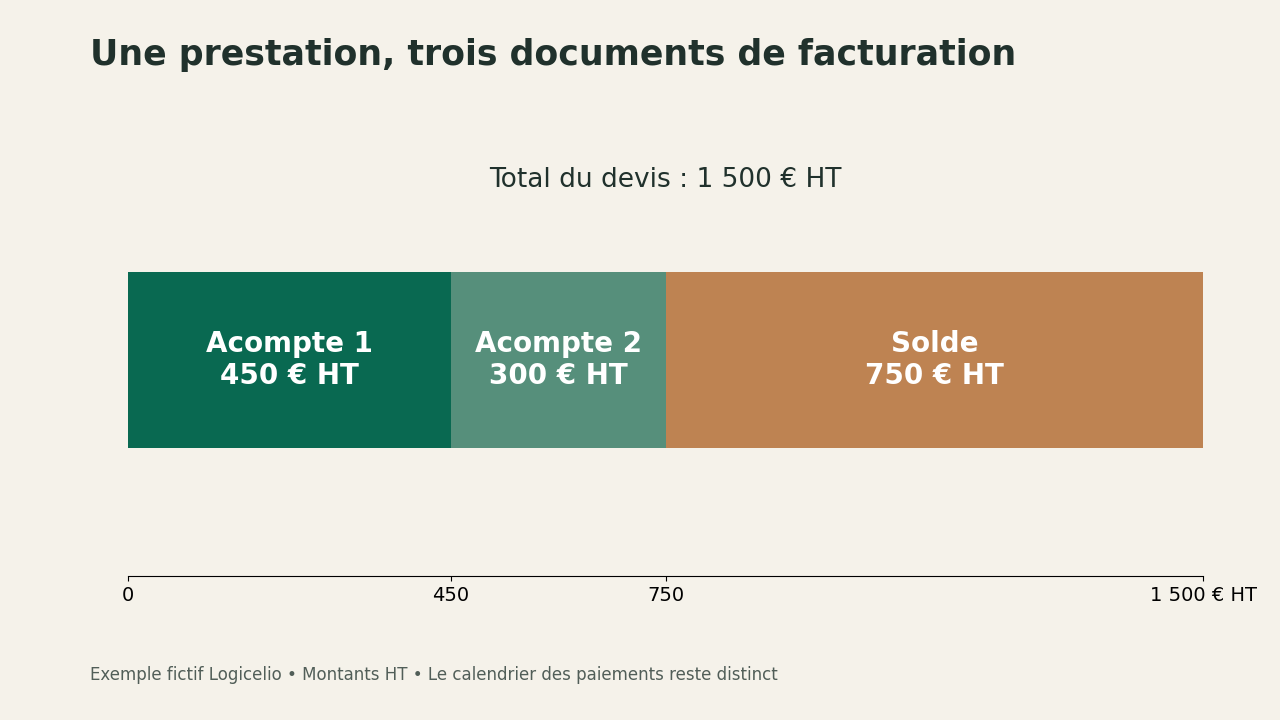
Imagine a service priced at 1 500 € excluding VAT, with a first deposit of 450 € excluding VAT and a second of 300 € excluding VAT. The amount still to invoice is 750 € excluding VAT: 1 500 minus 450 minus 300. This calculation illustrates how the price is split, not VAT rules or a situation recorded in Indy. Applicable taxes must be handled according to your circumstances.
| Scenario document | Amount excluding VAT | Effective monitoring |
|---|---|---|
| Initial quote | 1 500 € | Total Perimeter Accepted |
| First deposit | 450 € | Reference to the correct estimate |
| Second instalment | 300 € | First deposit retained |
| Balance | 750 € | Total of three invoices: 1 500 € excluding VAT |
Then check a second measure: the money actually received. If the second deposit remains unpaid, the invoice breakdown may be correct while your cash tracking is not. Do not confuse “remaining to invoice” with “remaining to receive”. The former depends on documents issued; the latter also requires payments and any refunds.
To make the records clear, note each invoice reference beside its corresponding payment date. If the customer makes one bank transfer for several documents, keep the allocation breakdown. This small reconciliation sheet is especially useful if a customer disputes the balance weeks later: you can explain the calculation without reconstructing the entire history from memory.
Correct an invoice: read the entire chain
The help centre guidance on credit notes distinguishes partial refunds, amendments and cancellations. An invoice created and then approved in Indy cannot simply be deleted: a correction requires a credit note. The amendment procedure creates a new draft after cancellation. Where both a deposit invoice and a balance invoice have already been issued, the specified order is to cancel the balance invoice before handling the deposit.
Before confirming, ask a concrete question: should the customer ultimately pay less, receive a refund or simply receive a corrected document? These situations require different checks. An incorrect address does not necessarily require money to move. For a refund, also reconcile the credit note with the bank transaction.
Reassemble the case after the correction: original document, credit note, new invoice if there is one, payments already received and balance due. Send the customer a short explanation with the references to keep. Avoid sending only the latest PDF without saying which document it replaces. The recipient must understand why two invoices with different numbers appear to concern the same service.
An imported invoice does not have the same route
For a folder started in another software, theaid on imports asks you to reproduce the information in the existing document, including its number, date and amounts. It provides for adding the PDF to extract its data and stresses that totals must match to the cent. Deposit invoices must be imported before the balance invoice, then linked to it. The import procedure is described for a computer.
Our migration advice: first assemble a single representative record with its original documents. Compare references and amounts after import, then reconcile payments. Do not automatically send a customer a document imported only to migrate your accounting records. Migrating historical records is not a new sale and must not be presented as one.
The procedure for correcting an imported invoice also varies with the financial year concerned, as explained in the help documentation on credit notes. For a transaction spanning two financial years, have the appropriate treatment for your tax regime confirmed before changing accounting entries. This guide aims to make document handling reliable; it does not replace that accounting decision.
Mark as paid only after verifying payment
The acquittal function adds a mention and payment information to the PDF. Indy requests the date and method of settlement, with an optional reference. This step concerns an invoice actually paid: it does not constitute a request for payment or proof that your bank has already received a transfer announced by the customer.
In a small team, assign receipt-of-payment checks to a named person. They check the amount, receiving account and reference, then reconcile the payment with the correct document. If a transaction is slow to appear, consult our bank synchronization diagnosis Indy before concluding an unpaid claim. If you need an archive to transmit, the guide to Indy exports complete this course.
What to check before adopting this operation
On a test file that you have mastered, review the PDF for each step: title, numbering, link to the estimate, down payments deducted and remains due. Add a correction case and a distributed settlement. This is a verification proposal for the reader; we do not claim any execution time or observed result. Do not use a real customer invoice as a disposable document.
The precise availability of functions depends on the offer and your profile. Check it in your space before you migrate your billing. The guide to Essentiel, Plus and Autonomie makes it possible to distinguish the choice of subscription from the course of an invoice. The best result expected here is a file understandable by the customer and by the person following your accounting.
Partner link
References and scope of this guide
Reconstruct the total after two deposits, distinguish the amount still to invoice from the amount still to receive, then check the document chain after a correction. Primary sources consulted on 29 September 2026: official advance payment procedure ; help centre guidance on credit notes ; aid on imports ; acquittal function