Do not recreate a missing bank transaction
A transaction that is missing in Indy may correspond to a delay, a missed connection or an incomplete history. Start by comparing the bank statement and the period displayed. Adding a manual operation without diagnosis can create a duplicate when the connection resumes.
Analysis of official documentation, with no testing on a paid account.
This analysis of the Indy support procedures was performed on the 29 September 2026. Follow the documented controls below, then the deadlines and instructions indicated by the assistance for your incident. It mainly concerns an external bank synchronized with Indy, the integrated business account with a separate procedure.
In this guide
- Describe the absence before touching the connection
- Four situations requiring different actions
- What button to use when the bank doesn't go up?
- Restore access without increasing manipulation
- Complete the history without inventing accounting entries
- An apparent duplicate is not always a mistake
- Close the incident with a period check
- References and scope of this guide
Describe the absence before touching the connection
Start with a specific transaction that you know the date, amount and original account. Check that it is on your bank's statement or recorded transactions and then search for it in Indy for a sufficiently wide period of time. Provisionally remove category or account filters that may mask a current transaction. The objective is to distinguish an absent data from a simply invisible data in the view used.
Thehelp on missing transactions states that transactions generally appear within 24 to 72 hours of becoming visible at the bank. It distinguishes recent transactions, missing transactions from the start of the financial year and a gap in an older period. It asks users not to enter manually a transaction already shown on the bank statement.
Note your symptom in one sentence: "Recent movements are coming, but March and April are missing" will be more useful in support than "the bank does not work". Also keep the exact message displayed and the date of the last imported transaction. A capture may complement these elements, but the original records remain the basis for reconciliation. Do not transmit a password or authentication code in a message.
Four situations requiring different actions
| Finding | First verification | Avoid |
|---|---|---|
| Only the last days are missing | Bank date and announced deadline | Create a manual line immediately |
| No new operation goes back | Status in Settings then Banks | Remove the connection at random |
| An old period is empty | Accurate points of the historic hole | Believing that a reconnection is enough |
| An operation appears twice | Comparison with the original recorded data | Arbitraryly choose a line to erase |
This table is a Logicelio diagnostic guide, rather than a software screen. It helps you choose which procedure to read and what evidence to gather. If an accounting deadline is approaching, tell support and the person overseeing the records: a technical delay does not automatically suspend your other obligations.
What button to use when the bank doesn't go up?
In Settings then Banks, follow the message corresponding to your situation. The reconnection procedure Indy, reverified the 11 October 2026, distinguishes these actions:
- Authentication requested: Use Verify, and then confirm the request in the official banking path.
- Denied identifiers: first check your access and pending messages on the bank's site, then use Reconnect.
- Internal error: use Retry. Indy advises trying again within two to three days if the error persists, then contacting support if it continues. This timeframe is not a repair guarantee.
A recent operation may ask 24 to 72 hours to go back according to thehelp on missing transactions. If only previous weeks are missing, go directly to the history control below: check their recovery in history.
Reporting template to be completed
This Logicelio model is used to describe the facts, without assuming the cause of the incident:
Affected account: [account name]. Last transaction received: [date]. Missing period: [start and end]. Are recent transactions arriving: [yes/no]. Exact message in Banks: [text]. Action already taken and result: [description]. Example transaction present on the statement but missing from Indy: [date, amount, description]. Can you confirm the period to recover and the channel for sending original bank PDF files?
Use the account’s official support service and the channel it specifies for documents. This message does not require any password or verification code. Include these details with your request to help support investigate the incident.
Restore access without increasing manipulation
The reconnection procedure Returns to Settings and then Banks. It distinguishes between renewed authentication, incorrect identifiers and an internal connector error. For identifiers, Indy invites you to check the direct access to the bank and any messages to validate in this area. A persistent internal error must be returned to support.
Perform one action at a time and record its result. If you simultaneously change the bank password, the Indy connection and the selected account, it becomes difficult to understand what worked. In a strong authentication request, make sure it matches your own attempt. Validate only on the official route provided by the bank; an interlocutor does not need you to dictate the code received.
After reconnecting, check two separate results: connection status and the presence of the expected transactions. A restored status does not prove the entire year has been retrieved. This distinction matters after a long interruption: a recent feed may work while an earlier period remains empty. Keep the list of missing dates for recovering the history.
Complete the history without inventing accounting entries
When Indy reports inconsistency, the consolidation of transactions lets you send statements for the specified account and period. The required files are original PDF documents, not scans. The application attempts to resolve the issue and may request additional statements or report an unusable format. A validated portion therefore does not necessarily mean the whole period is complete.
Prepare a list of available months before mailing. For each account, take the first and last month covered; find an empty file, a bad year or a record belonging to another institution. Download the documents from your bank space instead of photographing printed sheets. Keep a copy of the submitted files and the date of the request in order to resume the exchange without returning a different set.
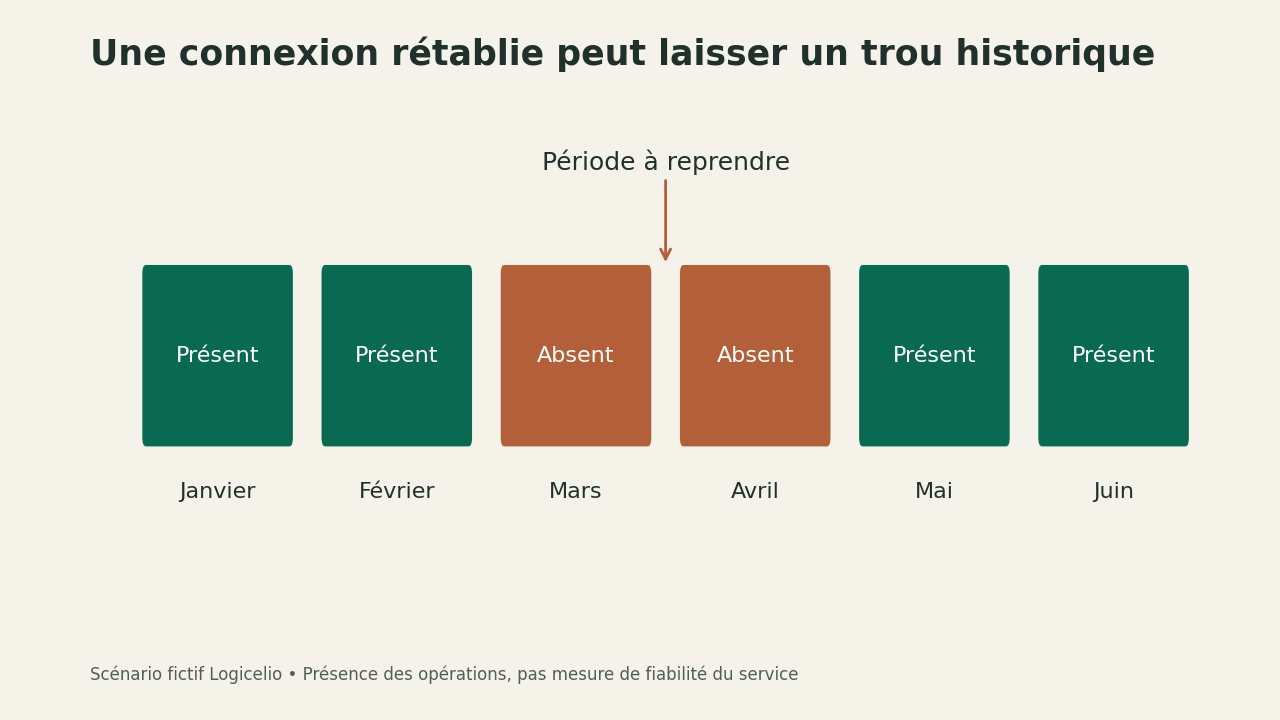
The outline of this guide represents a fictional history: January and February are present, March and April are missing, then May and June date back. His lesson is limited but useful: the arrival of the last operations does not erase the previous hole. We do not measure here the reliability of a bank or the speed of an aggregator.
An apparent duplicate is not always a mistake
The documentation on deletion indicates that a synchronised transaction cannot be erased freely. For a duplicate, Indy requests the statement allowing the support to see the absence of the second operation. The lines entered manually follow another route. Check the origin of each line before applying a procedure found for a different case.
Two identical amounts are not sufficient to demonstrate a duplicate. They can be two purchases, debit followed by a refund or transfer between accounts. Theaid on internal transfers explains that a transfer between two synchronised professional accounts produces an output and an input. These two movements are expected; removing them to keep only one line would destroy the reading of the transfer.
To prepare a report, line up the date, transaction label, direction, amount and account. Highlight the difference between the bank statement and Indy without drawing conclusions about the technical cause. This description lets support check the case and helps you avoid treating a simple presentation difference between the two interfaces as an error.
Close the incident with a period check
Take over the operation that triggered your search, then review the beginning and end of the reported hole. Check several intermediate movements and any lines added manually before diagnosis. If the support has made a recovery, ask what period and what accounts it covers. Keep the answer with your statements: it explains the corrections in case of a later question.
Do not close your check merely because the banner has disappeared. The practical criterion is whether you can explain the differences initially identified. If a customer payment was involved, also revisit the invoice tracking before sending that customer a reminder. Our guide to invoices and instalments separate document issued and receipt received.
To keep a workable record, see exports of accounts and evidence. The Presentation of Indy and choice of subscription answer different questions: changing plans does not, by itself, repair a bank connection.
Partner link
References and scope of this guide
Classify four symptoms and check a repeat for the entire expected period, instead of considering the only connection status as evidence of completeness. Primary Sources Consulted on 29 September 2026: help on missing transactions ; reconnection procedure ; consolidation of transactions ; documentation on deletion ; aid on internal transfers